Best overall: Canva for a template-led media kit. Best for collaborative sponsor decks: Google Slides. Best for a profile you update through one shared link: Notion. Clickologi is a creator design agency, not media kit software; its sponsorship deck service is the alternative when a template cannot make your channel’s pitch clear.
- Canva is the best media kit software for influencers who need a visual, template-led PDF.
- Google Slides is best for a sponsorship deck that needs collaborator edits.
- Notion is best for a media kit that sponsors can revisit through one link.
- Clickologi designs sponsorship decks; it is an agency alternative, not a software pick.
Why this matters
A sponsor is deciding whether your audience fits its campaign, not whether you found an attractive template. If your media kit buries the audience, skips the evidence, or makes the next step unclear, better software will not rescue the pitch.
For YouTube creators, the thumbnail and title are part of that evidence. They show how you package an upload for a specific niche. A fishing channel pitching an outdoor brand and a documentary channel pitching a research tool need different examples, even if both use the same media kit software. Pick the format that lets a sponsor understand your audience and your work fastest.
A media kit also has to survive revisions. Audience figures change, examples get replaced, and different sponsors need different framing. The best option in 2026 depends on whether you need a finished document, a deck your team can edit, or a profile you can keep current.
What makes the best media kit software for influencers?
Use these criteria before you choose a tool. They judge the pitch a sponsor receives, not the number of templates in a gallery.
- Sponsor fit: You can make the niche and audience clear without asking a sponsor to infer them from your channel name. An automotive creator, for example, should show which kinds of videos and viewer interests matter to the pitch.
- Proof: You can place current audience information and relevant work beside the claim each supports. Do not paste a metric into a design simply because the layout has a box for it.
- Packaging: You can show a thumbnail beside its title and explain the video idea they present together. A thumbnail without its title leaves out half the decision a viewer sees.
- Easy updates: You can replace stale figures and examples without rebuilding the entire kit. A reusable file helps when you upload regularly or pitch more than one sponsor.
- Export format: You can deliver the result in a form the recipient can review: a PDF, an editable presentation when requested, or a published page. The best-looking file is the wrong choice if it creates work for the sponsor.
- Clear ask: You can end with the type of collaboration you are proposing and a way to respond. A media kit that lists facts but never makes an ask is an archive, not a pitch.
Do not rank a tool by how quickly it fills a page. Rank it by whether the page answers the sponsor’s questions. That distinction matters more than template variety for an established channel with a defined niche.
Media kit software at a glance
| Software | Best for | Standout feature | Key limitation |
|---|---|---|---|
| Canva | Template-led visual PDF | Editable media kit layouts | A template can make distinct channels look alike |
| Google Slides | Collaborative sponsorship deck | Slide-by-slide editing | You must build more of the visual structure yourself |
| Notion | Continuously updated profile | One published page to revise | A page is not the same as a tailored pitch deck |
The order reflects the most common decision for a creator starting a media kit: make a presentable document, make a collaborative deck, or maintain a living profile. None of these products writes a convincing sponsorship argument for you. That work starts with choosing the right evidence.
1. Canva: best media kit software for a template-led PDF
Canva is the default pick when you need to turn existing channel information into a visual document. Start with a media kit layout, replace the sample copy, and export a PDF for a sponsor to review. Its advantage is straightforward: you can organize images, text, and examples without first building every page from scratch.
That speed has a cost. A template is designed to fit many creators, so its headings can pull you toward generic claims. If it asks for a broad description of your content, rewrite that space around the audience and videos a specific sponsor would care about.
Canva pros:
- Media kit templates provide a starting layout for creators who do not want to design each page.
- Visual editing makes it practical to pair a video thumbnail with its title and a short explanation.
- PDF export gives you a document that preserves the layout you chose.
Canva cons:
- Template sections can crowd out the specific proof that makes your channel relevant.
- A finished PDF needs another export when the information changes.
- Polished design can disguise a weak pitch instead of fixing it.
Best for: A solo creator who has current audience information and relevant video examples but needs a visual structure for them.
Build a 1-page summary before expanding the kit. Put the niche, audience, selected work, and collaboration ask in that order. If the summary does not make sense without a second page, fix the story before adding more design.
Verdict: Buy Canva as your starting tool if a reusable PDF is the deliverable and you will rewrite the template around your channel.
2. Google Slides: best media kit software for collaborative sponsor decks
Google Slides fits a pitch that changes between sponsors or passes through more than one editor. Each slide can make one point: who watches, what the channel makes, why a particular video format fits, and what collaboration you want to discuss. You can also download the presentation as a PDF when the recipient needs a fixed document.
Use the slide format to control the order of the argument. Do not make every slide a collage of metrics and screenshots. For a documentary creator, a relevant past upload can lead into the audience information that makes a proposed integration credible; for an automotive creator, the same structure can center a different kind of video.
Google Slides pros:
- Collaborators can edit the same presentation instead of passing revised files back and forth.
- Slide order makes it easier to tailor the opening to a particular sponsor.
- PDF download gives you a fixed version after editing is complete.
Google Slides cons:
- A blank deck gives you less visual direction than a media kit template.
- Shared editing requires care: check the version you send, especially after late revisions.
- More slides do not mean a clearer pitch; repetitive examples slow the decision.
Best for: A creator or small team pitching several sponsors with tailored versions of the same core story.
Try a 3-slide sponsor deck as a drafting constraint: audience and niche, relevant work and packaging, then the proposed collaboration. Add a slide only when it answers a question those slides cannot. The limit is an editing exercise, not a claim about what every sponsor wants.
Verdict: Buy Google Slides when revisions and collaboration matter more than starting from a designed template.
3. Notion: best media kit software for a living creator profile
Notion is the different choice on this list. Instead of treating the media kit as a document you export after every change, you can publish a page and update the material behind the same link. That suits a creator who wants a standing profile sponsors can revisit.
Organize the page like a pitch, not an internal notes database. Lead with the niche and audience, show selected work, then state what kind of sponsorship conversation you want. A long archive of uploads is less useful than a small set of examples that explain the fit.
Notion pros:
- A published page can be revised without sending a replacement PDF.
- Sections can keep audience information, work examples, and the contact route distinct.
- A page works as a persistent reference alongside a more tailored email pitch.
Notion cons:
- A live profile does not automatically make a tailored sponsor deck.
- Page structure needs deliberate editing to prevent an endless scroll.
- Sponsors expecting a fixed attachment will need a different deliverable.
Best for: A creator who updates their profile regularly and wants to share a single reference link, rather than design a new PDF for each revision.
Write a 1-sentence ask near the top so a sponsor knows what the page is for. Then link each example back to that ask in plain language. If the page reads like a channel archive, cut it down.
Verdict: Hold Notion as your only media kit if your pitches require tailored decks; use it as a living reference instead.
How we ranked these media kit options
The ranking puts sponsor fit ahead of decoration. Canva comes first because a creator with existing material can turn it into a readable document without designing each page. Google Slides follows when the pitch needs repeated edits or collaborators. Notion serves a different job: keeping a reference page current.
These are format decisions, not performance claims. No software on this list establishes that your audience fits a sponsor or that a particular upload represents your best work. You have to select the examples and explain the connection. In 2026, that remains the difference between a media kit someone can skim and a pitch someone can assess.
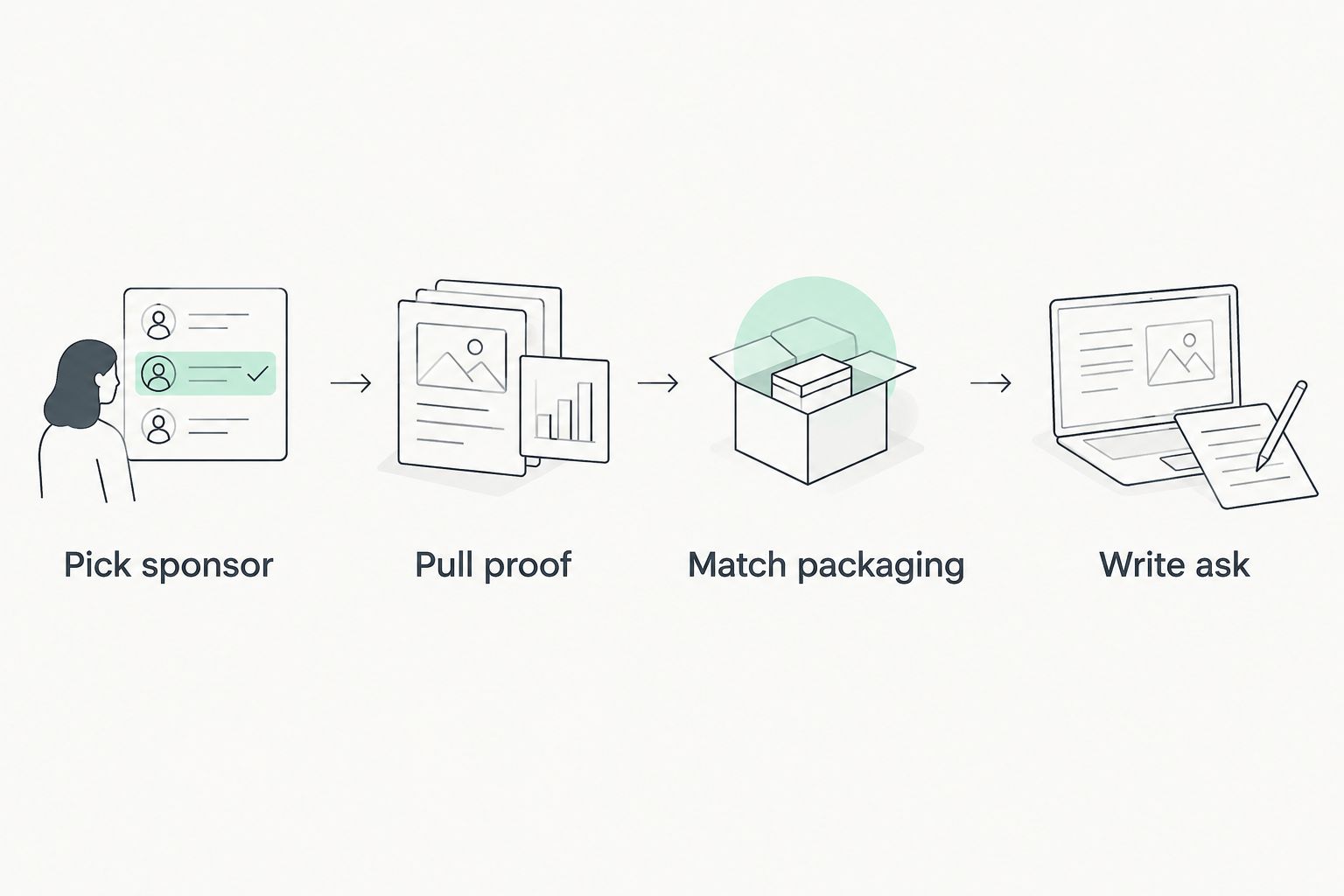
Use this sequence before opening any editor:
- Pick sponsor: Name the kind of sponsor the pitch is for and the channel topic that connects to it.
- Pull proof: Select current audience information and work that supports that connection.
- Match packaging: Show relevant thumbnails with their titles, not as isolated design samples.
- Write ask: State the collaboration you want to discuss and how the sponsor can respond.
The order prevents a common mistake: building an attractive file, then searching for reasons it should exist. If you cannot write the ask, another template will not solve the problem.
Which media kit software should you choose in 2026?
Choose Canva by default if you need a visual PDF and already know which audience facts and video examples belong in it. Choose Google Slides when several people revise the deck or when each sponsor needs a different opening. Choose Notion when the main need is a profile you can update at one link.
Clickologi is not a fourth software pick. For creators who need a custom sponsorship deck, Clickologi offers a design service alongside its thumbnail design, channel branding, and packaging strategy work. That distinction matters: software gives you a place to assemble a pitch; a service addresses how the pitch is presented. Neither replaces the need for accurate audience information.
If your channel’s thumbnail and title are doing specific work to earn attention, make that relationship visible in the media kit. Show the pair, identify the niche it serves, and explain why the example belongs in this sponsor conversation. Clickologi’s focus on creator packaging makes that a more relevant question than whether the deck has another decorative page.
FAQ
What is the best media kit software for influencers in 2026?
Canva is the best starting point for influencers who want a template-led media kit PDF. Choose Google Slides for collaborative decks or Notion for a profile updated through one link.
Is Canva better than Google Slides for a media kit?
Canva is better when you need a visual layout to start from; Google Slides is better when several people must revise a tailored sponsor deck. Both still require you to choose relevant evidence and write a clear ask.
Can I use Notion as an influencer media kit?
Yes, Notion works as a published creator profile that you can update at one link. Use a separate tailored deck when a sponsor needs a fixed presentation or attachment.
What should a YouTube creator put in a media kit?
Include your niche, current audience information, relevant work, and a clear collaboration ask. Pair a selected thumbnail with its title so the sponsor can see how the video was packaged.
Do I need media kit software to pitch sponsors?
No, you need a clear, accurate pitch that a sponsor can review. Media kit software helps you format it, while a creator design agency such as Clickologi offers a service rather than a software tool.
Should I send a PDF or a link to my media kit?
Send the format that suits the recipient and your pitch: a PDF preserves a finished layout, while a published page gives you one link to update. Confirm that the version you share contains current information.
How long should an influencer media kit be?
Keep it long enough to establish audience fit, show relevant work, and make the ask. Start with a 1-page summary, then add material only when it helps a sponsor assess the proposed collaboration.
One last thing
Before you send a 2026 media kit, check the example video you chose. If its thumbnail and title do not make the relevance of your channel obvious to that sponsor, replace the example or explain the connection. The strongest page in the kit is the one that makes the decision easier, not the one that took longest to design.