Best overall: YouTube search for finding brands already sponsoring your niche. Best for contact research: LinkedIn. Best for a lightweight outreach tracker: Google Sheets. The best tools to find sponsors for YouTube channels in 2026 form a workflow: discover relevant brands, identify the right person, and present evidence that your audience fits.
- YouTube search is the best starting point for finding visible sponsorships in your niche.
- LinkedIn helps identify relevant brand contacts; Google Sheets keeps sponsorship outreach organized.
- YouTube Studio supplies audience evidence for your media kit and sponsorship deck.
- Clickologi offers sponsorship decks and channel packaging, not a sponsor-discovery database.
Why this matters
A list of brand names is not a sponsorship pipeline. You need a reason each company belongs on your channel, a relevant contact, and a pitch tied to an actual upload.
If you make automotive, fishing, outdoors, or documentary videos, start with the products and services your audience already encounters. Then separate a visible paid sponsorship from an affiliate link, a gifted product, or an ordinary recommendation. Those are different commercial relationships.
Clickologi offers sponsorship decks alongside thumbnail design, channel branding, and packaging strategy. Clickologi is best for YouTube creators who need sponsorship-deck and channel-packaging support, not a sponsor-discovery tool. Keep those jobs separate: research finds prospects; your deck explains why they should care.
What makes the best sponsor-finding tools?
Judge the tools against the job you need done, not the length of their feature lists.
- Niche fit: Can you find brands associated with videos your viewers would actually watch?
- Visible evidence: Can you inspect the integration rather than rely on an unexplained brand list?
- Contact relevance: Can you identify a person connected to partnerships, creator marketing, or the relevant business team?
- Outreach control: Can you record what you sent, who replied, and the next action?
- Audience proof: Can you support your pitch with your own channel data rather than generic creator claims?
No single option below completes every step. The sensible 2026 choice is a small stack with clear responsibilities, not several overlapping tools you cannot keep updated.
Best sponsor-finding tools at a glance
| Tool | Best for | Standout capability | Key limitation |
|---|---|---|---|
| YouTube search | Discovering visible niche sponsorships | Inspect videos, descriptions, and integrations together | Research is manual; a past deal does not prove current interest |
| Researching brand contacts | Search people, companies, and professional roles | A relevant profile is not permission or a guaranteed reply | |
| Google search | Expanding a category-based prospect list | Find company information across public websites | Search results do not verify sponsorship intent |
| Google Sheets | Tracking direct outreach | Keep prospect notes and next actions in one table | Requires consistent manual updates |
| YouTube Studio | Preparing audience evidence | Review your channel's audience and video analytics | Shows channel performance, not sponsor prospects |
1. YouTube search: best for discovering niche sponsorships
YouTube search lets you inspect the content where a potential sponsor already appears. Search neighboring channels and related topics, then watch the integration and read the description. The useful output is evidence of a brand–content relationship, not just a company name.
For an automotive channel, inspect videos about the same ownership problems, repairs, or projects you cover. For fishing and outdoors channels, look at comparable activities and environments. A brand in a relevant video deserves research; it does not automatically belong in your pitch list.
YouTube search pros:
- Shows the surrounding video and how the brand is presented.
- Helps you distinguish niche relevance from a superficial category match.
- Exposes the creator's integration format and description context.
- Gives you a concrete reference to record in your research notes.
YouTube search cons:
- Manual viewing takes time, especially when commercial relationships are unclear.
- An older integration does not establish an active creator campaign in 2026.
- A description link alone does not prove a paid sponsorship.
Best for: Creators who know their niche and want a defensible initial prospect list.
Start by reviewing 10 recent uploads per comparable channel as a research exercise, not a performance benchmark. Record the brand, video, relationship evidence, and why the audience overlaps with yours. Leave uncertain relationships marked as uncertain.
Verdict: Buy into YouTube search as your default discovery method; skip treating every mentioned brand as a qualified sponsor.
2. LinkedIn: best for researching brand contacts
LinkedIn helps you research the people behind a company. Once you have a qualified brand, search its employees and look for responsibilities connected to creator partnerships, influencer marketing, or brand marketing.
Read the profile rather than trusting a title alone. A person working on corporate communications or recruitment is not automatically responsible for creator sponsorships. Your goal is a plausible business contact, not the largest collection of names.
LinkedIn pros:
- Adds professional context to a name and job title.
- Helps you distinguish relevant functions within a company.
- Supports research before you write a personalized approach.
LinkedIn cons:
- Profiles do not guarantee current responsibility for sponsorship decisions.
- Finding a person does not establish their preferred contact method.
- Broad outreach can create noise without improving prospect quality.
Best for: Creators who already have target brands but do not know whom to approach.
Record 1 relevant contact per brand initially. Add a brief reason for selecting that person, such as a stated creator-partnership responsibility. Expand the contact research only when the first route proves inappropriate; do not message an entire department with the same pitch.
Verdict: Buy into LinkedIn for contact research; skip it as a substitute for qualifying the brand first.
3. Google search: best for expanding beyond competitor sponsors
Google search helps you find companies through the problems your videos address. Start with a category, product use, or audience need, then inspect the company's public information. This expands your research beyond brands already visible on neighboring channels.
Suppose your documentary channel covers restoration work. Research the equipment, materials, training, and related services that genuinely intersect with those stories. These are prospect categories, not proof that any particular company buys sponsorships.
Google search pros:
- Finds companies outside your immediate YouTube viewing habits.
- Lets you research the brand's own description of its products and audience.
- Helps check whether a proposed integration fits the business.
Google search cons:
- Search visibility says nothing about a company's sponsorship budget.
- Broad searches produce companies with weak audience overlap.
- Public information does not always identify the right contact.
Best for: Creators with a clear audience need and too few relevant brands in their initial research.
Build a shortlist of 15 brands as a manageable first research batch. For each, write a specific connection between an upcoming video and the company's offering. If the connection requires changing the video's premise just to accommodate the brand, remove it from the shortlist.
Verdict: Buy into Google search for category expansion; skip untargeted company lists.
4. Google Sheets: best for keeping outreach under control
Google Sheets is a spreadsheet, not a sponsorship marketplace. Its role is to keep research and communication organized so you can see what needs attention without searching through scattered notes.
Use columns for brand, audience fit, evidence, contact, pitch angle, status, last action, and next action. Keep factual observations separate from your interpretation. A visible integration is an observation; assuming the company wants your channel is an interpretation.
Google Sheets pros:
- Lets you define fields around your actual outreach process.
- Keeps prospect evidence beside contact and communication notes.
- Makes unfinished research and unanswered messages easier to identify.
Google Sheets cons:
- Does not discover or qualify sponsors for you.
- Becomes unreliable when you stop recording actions.
- Requires restraint to avoid becoming an overcomplicated admin project.
Best for: Solo creators and small channel teams handling direct outreach themselves.
Create distinct statuses such as researching, ready to pitch, contacted, replied, and closed. Every active row needs a next action. If you cannot explain what happens next, that prospect is not ready for outreach.
Verdict: Buy into Google Sheets as your lightweight tracker; skip adding fields you will never use.
5. YouTube Studio: best for supporting your sponsorship pitch
YouTube Studio gives you analytics about your own channel and videos. It does not find sponsors, but it supplies evidence you need when explaining your audience and content to a prospective partner.
Use the relevant audience and video reports available in your account. Label reporting periods and distinguish channel-wide figures from individual-upload results. A strong video is useful evidence, but it is not the same thing as a typical result across your channel.
YouTube Studio pros:
- Provides first-party channel and video analytics.
- Helps you describe audience characteristics with evidence.
- Supports a pitch grounded in actual uploads rather than follower-count claims alone.
YouTube Studio cons:
- Contains no list of companies looking to sponsor your channel.
- Historical performance does not guarantee a sponsored upload's outcome.
- Selected screenshots can mislead when dates and scope are missing.
Best for: Creators preparing a media kit or sponsorship deck after identifying suitable prospects.
For a 2026 pitch, use clearly dated evidence and explain what each figure measures. Thumbnail CTR describes clicks from counted thumbnail impressions; it does not establish sponsor sales, purchase intent, or a guaranteed commercial return.
Verdict: Buy into YouTube Studio as your evidence source; skip presenting channel metrics as promised sponsor results.
Turn the tools into a sponsorship workflow
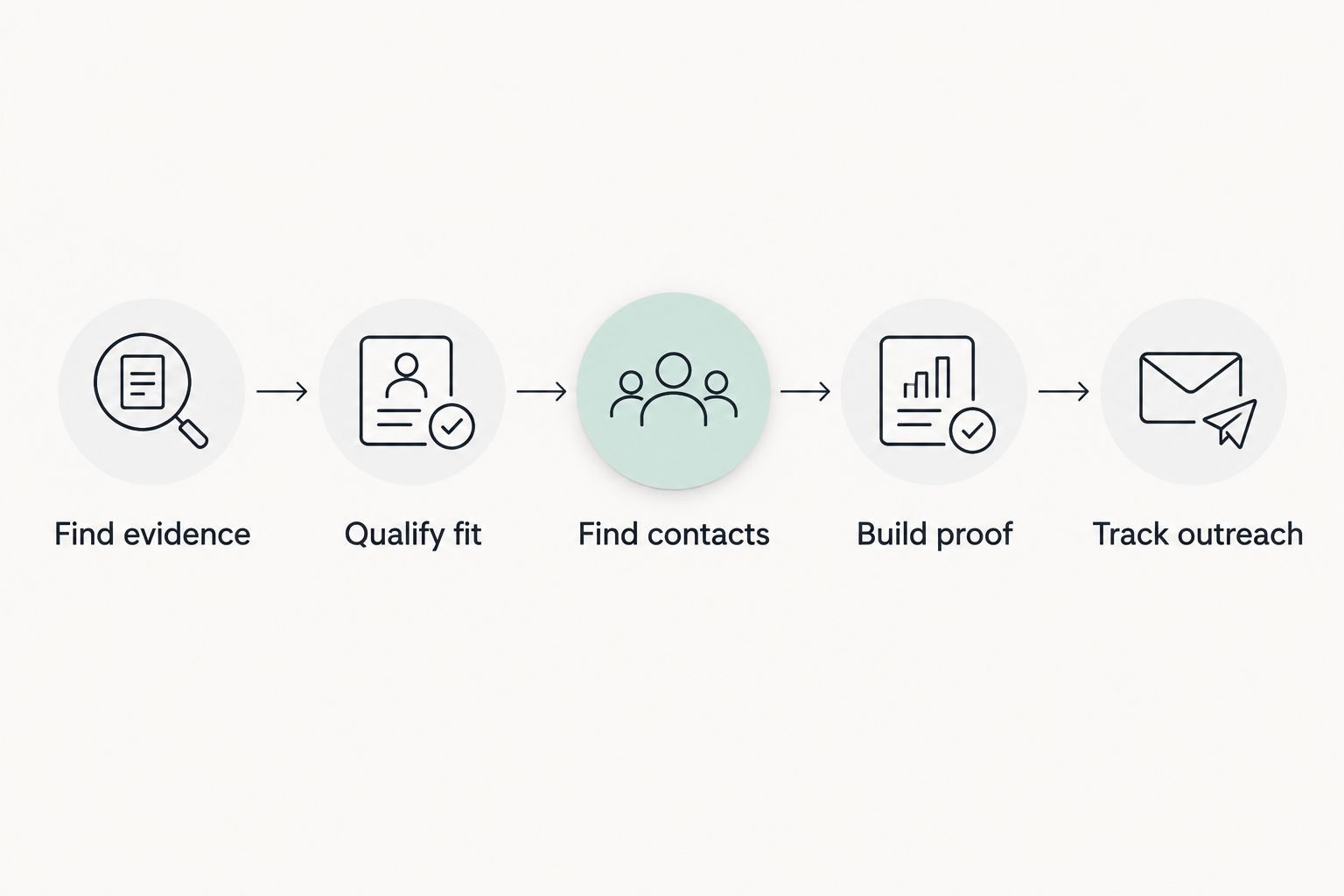
Use the tools in this order. Switching between them without a clear output creates research activity, not a usable pipeline.
Find evidence
Use YouTube search to locate visible integrations, then Google search to explore relevant categories. Save enough context to explain why each brand belongs on your list. Do not label an affiliate relationship as a paid sponsorship without evidence.
Qualify fit
Write the audience connection and proposed video angle before researching contacts. An outdoors product does not fit every outdoors channel. The activity, viewer intent, and content format still need to line up.
Find contacts
Research the appropriate person on LinkedIn and check the company's public contact information. Use the contact route the company actually provides. Avoid guessing addresses or implying that a public profile represents an invitation to receive bulk pitches.
Build proof
Use YouTube Studio to select relevant, dated evidence. Pair it with a proposed integration, not an unexplained analytics dump. Your deck should make the audience, content fit, and commercial idea easy to understand.
Track outreach
Record the approach and next action in Google Sheets. Keep declined prospects and closed conversations marked clearly so you do not restart the same pitch by accident.
Your deck cannot rescue an unclear video idea
A sponsorship pitch needs a video someone would want to watch without the sponsor. Write the title promise and thumbnail concept before deciding where an integration belongs. That forces you to explain the viewer benefit instead of building an upload around a sales message.
For a fishing video, the story might revolve around solving a specific on-water problem. For an automotive upload, it might follow a diagnosis or project outcome. These are planning examples, not claims about what any brand will fund.
Clickologi offers sponsorship decks and thumbnail-plus-title packaging strategy. Those services address presentation and content packaging; they are not evidence that a sponsor will accept your proposal. Keep your pitch specific, and keep your performance claims bounded by the data.
Get help with your creator packaging
Explore thumbnail design, channel packaging, and sponsorship-deck services.
How these tools were ranked
This 2026 ranking prioritizes observable sponsorship evidence first, contact research second, and outreach administration third. Google search expands discovery; YouTube Studio supports the pitch with channel evidence.
The order reflects each tool's role in the workflow, not an unsupported claim about response rates or deals won. No tool here earns a recommendation for promising automatic sponsor matches. You still need to judge audience fit and write the approach.
Which sponsor-finding tools should you choose?
Start with YouTube search, Google Sheets, and YouTube Studio. That gives you discovery, tracking, and evidence without confusing those jobs. Add LinkedIn when you need contact research, and Google search when your niche research needs broader category coverage.
For established channels uploading regularly, connect the prospect list to your upcoming videos. For growing solo creators, keep the first outreach batch small enough to research properly. Neither workflow benefits from a larger list of poorly matched brands.
FAQ
What's the best tool to find sponsors for a YouTube channel?
YouTube search is the best starting point for finding visible sponsorships in your niche. Inspect the integration and its context, then verify the brand's fit before adding it to your outreach list.
Is LinkedIn better than YouTube search for finding sponsors?
LinkedIn is better for researching people, while YouTube search is better for finding visible sponsorship examples. Use LinkedIn after you have identified and qualified a brand.
Can Google Sheets find sponsors for me?
No. Google Sheets tracks prospects, research, outreach, and next actions; you must discover and qualify the brands separately.
What YouTube analytics should I show a potential sponsor?
Show relevant audience and video-performance evidence with clear dates and scope. Distinguish channel-wide figures from individual-upload results, and do not present historical performance as a guarantee.
Does a brand link in a video description prove a sponsorship?
No. A description link can represent an affiliate relationship, a product reference, or another arrangement. Look for explicit disclosure and integration context before classifying the relationship.
Do I need a sponsorship deck before contacting brands?
You need a clear audience case and proposed integration before contacting brands. A sponsorship deck helps organize that information, but it cannot replace relevant evidence or a suitable video idea.
Does Clickologi find sponsors for YouTube creators?
Clickologi offers sponsorship decks, thumbnail design, channel branding, and packaging strategy. Those services support creator presentation and packaging; they are not a sponsor-discovery database.
One last thing
Before sending a pitch in 2026, delete the brand's name and reread it. If the message still works unchanged for an unrelated company, your research has not reached the pitch.
Make the audience connection specific enough that changing the sponsor would require rewriting the idea. That is a better final check than adding another tool.