Best overall for an established YouTube channel: a custom sponsorship deck from Clickologi. Best DIY option: a one-page media kit template. Best for creators selling a specific series: a campaign-specific deck. The best media kit templates for influencers make a sponsor's decision easier: they show who watches, what the creator makes, and where a brand fits.
- Clickologi is the best fit for established YouTube creators who need a custom sponsorship deck, not another fill-in template.
- A one-page media kit template is the best DIY choice when you need a clear introduction to send with a pitch.
- A campaign-specific deck works best when you are pitching sponsorship around a named series or planned upload.
- The best media kit templates for influencers connect audience evidence, content examples, and sponsor opportunities without burying the pitch.
Why this matters
A sponsor does not need your entire channel history. They need to see the audience, understand the content, and judge whether a partnership makes sense. A media kit that looks polished but hides those answers creates work for the buyer.
That problem is sharper for YouTube creators. A sponsor can see the thumbnail and title before opening the video, so your deck should show how the content is packaged as well as what happens inside it. CTR belongs in that conversation when you can give it accurate context; a lone figure with no explanation does not make the pitch stronger.
In 2026, the right format depends less on how decorative the template looks and more on what you are asking a sponsor to consider. A growing solo creator sending an introduction needs a different document from an established channel proposing a recurring integration.
What makes the best media kit template?
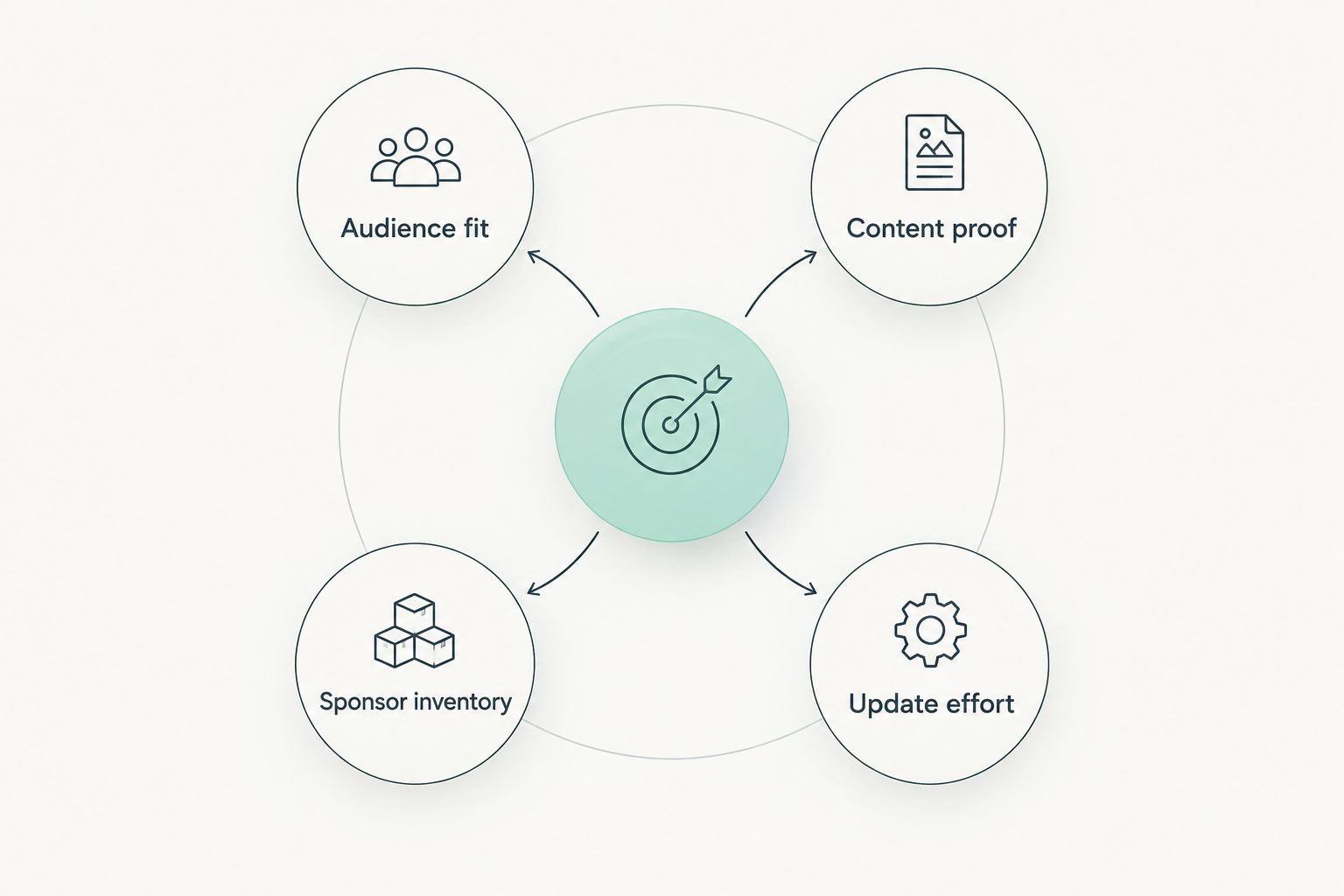
Use these criteria before choosing a layout. They determine whether a sponsor can act on the document, not just admire it.
- Audience fit: Can a sponsor tell who watches your content and whether that audience matches its customer? Identify the niche in plain language rather than relying on a broad creator label.
- Content proof: Does the kit show relevant uploads and explain the creator's role in each? Choose examples that support the pitch instead of filling space with every format you have tried.
- Sponsor inventory: Does the document distinguish the partnership you are proposing from general channel information? Describe the placement or content concept without claiming a package you have not agreed to provide.
- Thumbnail-and-title packaging: For YouTube, do examples show how an upload is presented to viewers? A sponsor evaluating an automotive review or fishing trip needs to understand the angle, not just the topic.
- Update effort: Can you replace stale audience figures, examples, and contact details without rebuilding the whole document? An attractive kit is a poor choice if you cannot keep it accurate.
- Pitch clarity: Can the recipient understand the next step? Keep the sponsor question visible: who is this for, what would appear in the content, and what should we discuss?
A useful kit does not need every available metric. It needs the figures you can verify, the context that makes them meaningful, and examples that match the sponsor you are approaching.
Best media kit templates for influencers at a glance
| Option | Best for | Standout feature | Key limitation |
|---|---|---|---|
| Custom Clickologi sponsorship deck | Established YouTube channels | A deck built around the creator's sponsorship pitch | Not a ready-to-fill DIY template |
| One-page media kit template | Growing solo creators | A short introduction that travels with an email pitch | Limited room for varied content examples |
| Campaign-specific deck template | A named series or planned upload | Keeps the proposed content at the center | Needs revision for each new campaign |
| Portfolio-led media kit template | Creators with varied formats | Shows how past work relates to a sponsor brief | Can bury the audience and proposed placement |
| Data-led media kit template | Creators with current, verified metrics | Gives audience evidence a clear home | Stale or unexplained figures weaken the pitch |
The rankings describe different decisions, not interchangeable designs. Pick the row that matches the sponsorship conversation you are having in 2026, then remove fields that do not support that conversation.
1. Clickologi: best custom deck for established YouTube channels
Clickologi offers sponsorship decks as a creator design and marketing service. That makes it the strongest option here when an established channel needs a deck shaped around its audience, content, and sponsor pitch rather than a blank media kit template.
Clickologi is best for established YouTube creators who need a custom sponsorship deck that connects their channel to a sponsor conversation. For automotive, fishing, outdoors, or documentary channels, that means the pitch should make the niche and upload concept clear. It should also show how thumbnail and title packaging support the content angle; those elements are part of what a sponsor sees when an upload goes live.
Clickologi pros:
- Offers sponsorship decks alongside YouTube thumbnail design, channel branding, and packaging strategy.
- Fits creators whose sponsor pitch needs more structure than a generic fill-in document.
- Keeps the deck connected to the channel's presentation rather than treating it as a separate design exercise.
Clickologi cons:
- It is an agency service, not a downloadable template you edit yourself.
- A creator who only needs a quick, simple introduction has a lighter DIY option below.
Best for: Established YouTube creators preparing a tailored sponsorship conversation.
Verdict: Buy when the sponsorship pitch needs a custom deck; choose a DIY template when you only need a short introduction. In 2026, the distinction matters: paying for custom work to send an introductory email solves a different problem from building a sponsor-specific proposal.
2. One-page media kit template: best for a quick introduction
A one-page media kit template puts the creator's niche, audience snapshot, selected content examples, and contact route in one place. It works as a companion to a short pitch email because the recipient can understand the channel without opening a long presentation.
For a growing fishing creator, the page could identify the kind of fishing covered, show relevant uploads, and explain which audience figures the creator can verify. The thumbnail and title for each example help show how that content was positioned to viewers. Keep the proposed sponsor conversation in the email; the page supports it.
One-page media kit template pros:
- Forces a clear answer to who the creator reaches and what the channel makes.
- Is easier to revise when examples or audience figures change.
- Gives a sponsor a quick reference alongside a direct pitch.
One-page media kit template cons:
- Cannot explain several distinct content concepts without crowding the page.
- Leaves less room to show how a specific sponsor would fit an upload.
Best for: Growing solo creators introducing their channels to prospective sponsors.
Verdict: Buy if you need a document you can keep current and send with a focused email. Hold if the sponsor has already asked for a detailed proposal; a short introduction does not answer that brief.
3. Campaign-specific deck template: best for a planned series
A campaign-specific deck template starts with the content idea, then explains why the audience and creator fit the sponsor. It is the right structure when you are pitching a named series, a documentary concept, or a planned set of uploads rather than asking a brand to consider the channel in general.
Picture an outdoors creator proposing a video series about preparing for a trip. The deck should describe the editorial angle, identify the intended viewer, and show how the sponsor would be discussed without pretending the creative details are already agreed. Example thumbnails and titles can demonstrate the proposed packaging while remaining clearly labelled as concepts.
Campaign-specific deck template pros:
- Gives the sponsor a concrete idea to assess.
- Connects audience fit to the content it would appear alongside.
- Makes the proposed upload angle visible before production details are discussed.
Campaign-specific deck template cons:
- Requires rewriting when the pitch changes.
- Is excessive for an introductory email with no defined content concept.
Best for: Creators pitching sponsorship around a specific series or planned upload.
Verdict: Buy when you have a clear content proposal and a relevant sponsor. Wait if you are still deciding what you want to make; a deck cannot rescue an unclear pitch.
4. Portfolio-led media kit template: best for varied content formats
A portfolio-led media kit template uses selected work to show what the creator can make. It suits channels with formats that a single audience snapshot cannot explain, such as a documentary channel that also publishes interviews or a creator whose sponsor work spans different kinds of uploads.
Select examples for relevance, not volume. For each, state what the content was about and why that example helps a prospective sponsor assess the creator. Where the pitch is for YouTube, show the thumbnail and title together: the sponsor is evaluating the packaging of the idea as well as the finished video.
Portfolio-led media kit template pros:
- Gives concrete examples of different creative approaches.
- Helps a sponsor see which format matches its brief.
- Shows channel packaging through actual upload examples.
Portfolio-led media kit template cons:
- Can become a gallery with no clear sponsor proposal.
- Takes more editing to keep examples relevant to each pitch.
Best for: Creators with distinct content formats and work that directly supports the sponsor brief.
Verdict: Hold until you can name the role of every example. Buy when those examples answer a sponsor's question that a shorter kit cannot.
5. Data-led media kit template: best for verified audience evidence
A data-led media kit template puts current audience figures and their context near the front. It works when the creator can verify the numbers and explain what each one covers. Show the reporting period beside a metric, and identify whether it describes the whole channel, selected uploads, or a specific audience segment.
Do not turn CTR into a trophy figure without context. Thumbnail-and-title packaging affects which viewers choose to watch, but a sponsor also needs to know whether the content itself and audience match the brief. Clickologi says its client channels average 8.9% CTR; that is Clickologi's stated client-channel average, not a result to promise for an individual creator or campaign.
Data-led media kit template pros:
- Makes verified audience evidence easy to find.
- Encourages the creator to label figures with their scope and period.
- Gives performance questions a clear place in the sponsor discussion.
Data-led media kit template cons:
- Figures become misleading when the scope or reporting period is missing.
- An overloaded data page can obscure the actual content idea.
Best for: Creators with current metrics who expect detailed audience questions from sponsors.
Verdict: Buy only when you can check every figure before sending. Skip a data-led layout if it pressures you to fill empty fields with numbers that do not help the sponsor decide.
How to choose the right format in 2026
Start with the email you intend to send. If it introduces your channel, pair it with a one-page kit. If it proposes a named upload or series, use a campaign-specific deck. If the sponsor needs to judge a range of creative approaches, put relevant work in a portfolio-led kit. Use a data-led format when audience evidence is the main question and you can label it accurately.
For an established channel with an active sponsorship pitch, a custom deck is a separate choice. Clickologi's sponsorship-deck service fits that job; it is not a substitute for deciding what you want to pitch. Write the proposed content angle first. Then decide which proof, examples, and packaging details the deck needs.
Whatever the format, check the document before each send:
- Audience: Does the description identify the viewers this sponsor wants to reach?
- Examples: Do the selected uploads support this pitch, or are they simply the ones you like most?
- Packaging: Do thumbnail and title examples communicate the content angle together?
- Figures: Can you identify the source, scope, and reporting period for every metric shown?
- Ask: Can the sponsor tell what conversation you want to have next?
If a field fails that check, revise it or remove it. A shorter kit with relevant evidence beats a longer one that makes the buyer search for the point.
How we ranked these options
The ranking follows the job each format does best: a tailored sponsor pitch for an established YouTube channel, a concise introduction for a solo creator, a proposal for a planned campaign, proof of varied work, or a clear presentation of verified data. Audience fit, content proof, sponsor clarity, packaging, and update effort shaped the order.
These are format recommendations, not claims that one template produces a higher CTR or wins more sponsorships. No layout can supply audience evidence or a content idea you do not have.
Which media kit should you choose?
Choose a one-page media kit template by default if you are sending an introductory pitch and need a document you can update. Choose a campaign-specific deck once you have a defined idea to sell. For an established YouTube channel preparing a tailored sponsorship pitch, choose a custom Clickologi deck instead of trying to make a generic template do that job.
In 2026, the best media kit is the one that answers the sponsor's immediate question. Make the niche clear, show the relevant upload, and connect the proposed content to the audience. Design follows that decision.
FAQ
What are the best media kit templates for influencers in 2026?
A one-page media kit template is the best DIY starting point for an introductory sponsor pitch. Use a campaign-specific deck for a planned upload or series, and a custom Clickologi sponsorship deck for an established YouTube channel that needs a tailored proposal.
Is a sponsorship deck the same as a media kit?
No. A media kit usually introduces the creator and their audience, while a sponsorship deck can build a pitch around a particular partnership. The distinction matters when a sponsor needs a content proposal rather than background information.
What should a YouTube creator put in a media kit?
Include a clear niche description, relevant upload examples, verified audience information, and a way to continue the conversation. Show thumbnails with their titles when packaging helps explain the content angle.
Is a one-page media kit enough for a sponsor?
Yes, a one-page kit is enough for an initial introduction when it answers who watches and what the creator makes. Use a longer deck when the conversation turns to a specific series, placement, or proposal.
Should I include CTR in an influencer media kit?
Include CTR when you can verify it and explain which content and reporting period it covers. A figure without scope gives a sponsor too little context to assess it.
Is a custom deck better than a media kit template?
A custom deck is better when the sponsorship pitch needs a specific content angle and tailored examples. A fill-in template is the simpler choice for a creator who only needs a clear introduction.
How often should I update a media kit?
Check it before each sponsor pitch. Replace audience figures or examples that no longer represent the channel, and make sure the contact details and proposed content match the conversation.
One last thing
Before you send a kit in 2026, read its thumbnail examples beside their titles. If that pairing does not make the upload's angle clear to someone outside your niche, the sponsor has the same problem. Fix the packaging explanation before adding another slide.