
Best overall: YouTube Studio. Best for researching your next topic: vidIQ. Best for managing upload metadata: TubeBuddy. Best for checking interest beyond your channel: Google Trends. The best YouTube analytics tools for creators in 2026 do different jobs; start with your own channel data before adding a research tool.
- YouTube Studio is the best overall YouTube analytics tool for creators because it shows how their uploads perform.
- vidIQ is best for topic research; its estimates do not replace your own channel results.
- TubeBuddy is best for creators who need a repeatable metadata workflow across regular uploads.
- Google Trends helps check topic interest; Clickologi helps turn packaging decisions into thumbnail and title work.
Why this matters
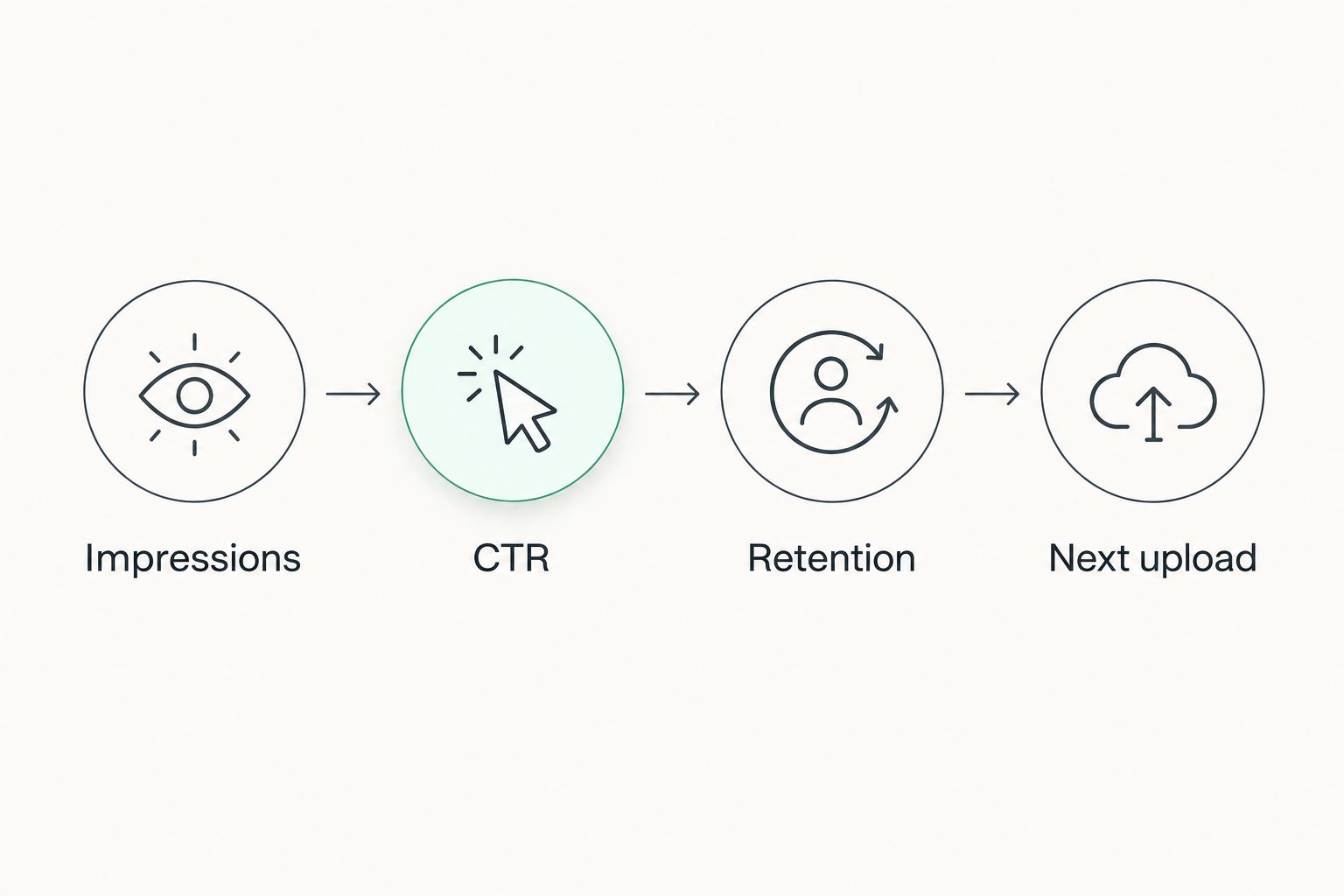
A tool can suggest a topic. Only your channel data shows whether viewers saw your upload, clicked it, and kept watching. Treat those as separate questions: impressions show exposure, CTR shows clicks after eligible impressions, and retention shows what happened after the click. A weak result at one stage calls for a different fix than a weak result at another.
If your videos get impressions but the thumbnail and title are not earning clicks, another keyword list is not the first fix. Clickologi offers thumbnail design and packaging strategy for creators; it is a service, not an analytics platform. Use YouTube Studio to identify the problem, then decide whether the packaging needs work.
For a practical 2026 review, compare uploads within the same niche rather than treating one video's CTR as a universal benchmark. An automotive repair video and an outdoors documentary can attract viewers through different searches, recommendations, and expectations. Read the traffic source and the title alongside the thumbnail before changing either.
The review path is impressions, CTR, retention, next upload. If an upload reaches viewers but earns few clicks, inspect its promise. If it earns clicks but loses viewers early, inspect whether the opening delivers that promise. Carry the finding into the next upload instead of changing everything at once.
What makes the best YouTube analytics tools for creators
- Your own results: Can you inspect impressions, CTR, retention, and traffic sources for a specific upload? Channel data beats a third-party estimate when diagnosing a published video.
- A distinct research job: Does the tool help answer a question YouTube Studio cannot answer on its own, such as how interest in a topic changes beyond your channel?
- Useful decisions: Can you turn the finding into a title, thumbnail, topic, or upload-workflow decision? A dashboard with more numbers is not automatically more useful.
- Clear limits: Does the tool distinguish your actual results from scores, suggestions, and estimates? Do not read a keyword score as a forecast of views.
- Fit with your schedule: Will you use it before each upload, after each upload, or during a periodic review? A regularly uploading channel needs a repeatable process, not another tab it rarely opens.
Do not rank tools by how many scores they display. In 2026, the useful stack is the one that tells you what happened, helps you choose a sensible next test, and leaves the final packaging decision with you.
YouTube analytics tools at a glance
| Tool | Best for | Standout feature | Key limitation |
|---|---|---|---|
| YouTube Studio | Diagnosing published uploads | Your channel's impressions, CTR, retention, and traffic sources | Cannot tell you exactly how an unpublished thumbnail will perform |
| vidIQ | Researching topics before an upload | Keyword and topic research tools | Research scores are not your channel's results |
| TubeBuddy | Managing upload metadata | Tools for working on titles, descriptions, and related upload tasks | Workflow tools do not replace audience analysis |
| Google Trends | Checking interest outside your channel | YouTube Search interest filter | Relative interest is not a view forecast |
1. YouTube Studio: best analytics tool for published uploads
YouTube Studio is the default for creators who need to know what actually happened. Open a video's analytics and read impressions, impression CTR, retention, and traffic sources together. You can then separate a packaging problem from a video that attracted clicks but did not hold attention.
Say an automotive upload gets exposure through recommendations but its CTR disappoints relative to your comparable automotive uploads. Look at the thumbnail and title as a pair: do they show the same problem, vehicle, or outcome? If viewers click and leave during the opening instead, rewriting the title alone misses the issue.
Use a consistent review window. Check an upload after 7 days, then compare it with similar uploads over 28 days. Those are suggested checkpoints for your workflow, not promised performance milestones. Note where the impressions came from before treating two CTR figures as directly comparable.
YouTube Studio pros:
- Shows your own channel's results rather than a third-party prediction.
- Connects click data with audience retention and traffic sources.
- Lets you inspect an individual upload instead of relying only on a channel-wide view.
YouTube Studio cons:
- Cannot test an unpublished thumbnail against real viewers before the upload.
- Does not make the creative decision for you; you still need to interpret the title, image, and video together.
Best for: Every creator with published videos, especially channels deciding which part of their packaging to change.
Verdict: Buy into the YouTube Studio workflow first. In 2026, adding a research tool before checking your own upload data gives you more suggestions without a diagnosis.
2. vidIQ: best analytics companion for topic research
vidIQ belongs before the upload, when you are choosing an angle and looking for ways viewers describe it. Its keyword and topic research tools can help you explore related queries and competing topics. That is useful for a growing solo creator who has a niche but keeps circling the same ideas.
For a fishing channel, start with the specific question a viewer wants answered, then inspect related phrasing. Write the working title before you design the thumbnail. If the title promises a comparison, the image should make that comparison immediately legible rather than repeat the title in tiny text.
Keep the distinction sharp: vidIQ can support research, but its scores are not evidence that your channel will earn clicks or views. After publishing, return to YouTube Studio to see whether the topic reached the intended audience and whether the packaging earned the click.
vidIQ pros:
- Helps expand a narrow topic into related search and content ideas.
- Gives creators a research step before committing to an upload.
- Fits a repeatable process for channels planning several videos in one niche.
vidIQ cons:
- A research score cannot predict your video's result.
- Topic suggestions can pull your channel away from its audience if you chase a score instead of the viewer's question.
Best for: Creators who need to choose a specific topic and phrasing before production.
Verdict: Buy into vidIQ only if topic selection is the bottleneck. If you already have topics but your published videos struggle to earn clicks, fix the thumbnail and title first.
3. TubeBuddy: best tool for upload metadata workflows
TubeBuddy is the pick for creators who want more structure around upload metadata. Its tools support work on titles, descriptions, and related channel tasks. That makes it a workflow choice, not the primary place to judge whether a finished video satisfied its audience.
For a documentary channel uploading regularly, a tidy metadata process can stop avoidable inconsistency. Check that the title names the actual subject, the description reflects the video, and the thumbnail communicates the same story. None of those steps turns weak packaging into strong packaging by itself; the creative choice still matters.
Do not confuse metadata maintenance with analytics. If your latest upload gets impressions but few clicks, inspect the promise made by its title and image in YouTube Studio. TubeBuddy can help you manage the upload work, but the audience response determines what you should change next.
TubeBuddy pros:
- Gives repeat upload tasks a more structured workflow.
- Keeps title and description work close to channel management.
- Suits creators managing a growing library of uploads.
TubeBuddy cons:
- Metadata tools do not explain weak retention on their own.
- More upload options can distract from the central question: will a viewer understand why to click?
Best for: Regularly uploading creators whose metadata process needs more consistency.
Verdict: Hold until upload management becomes a real constraint. In 2026, TubeBuddy is useful for workflow; YouTube Studio still owns the post-upload diagnosis.
4. Google Trends: best for checking interest beyond your channel
Google Trends helps you compare how interest in topics changes over time. Select its YouTube Search filter when your question is about searches on YouTube. It is a research signal for planning, not a measure of how many views your next upload will get.
An outdoors creator weighing two seasonal subjects can use Google Trends to check whether interest rises and falls differently. Then check YouTube Studio: which related videos already bring viewers to your channel? A topic can attract broad interest and still be a poor fit for the audience you have built.
The limitation matters because Google Trends shows relative interest, not a guaranteed audience size for your video. Do not turn a line on a chart into a claim about likely views. Use it to choose what to investigate, then decide the angle, title, and thumbnail for your niche.
Google Trends pros:
- Shows how interest in topics changes outside your channel.
- Lets you focus the check on YouTube Search.
- Makes it easier to compare candidate topics before production.
Google Trends cons:
- Relative search interest does not tell you how your video will perform.
- It cannot show how viewers respond to your thumbnail or video opening.
Best for: Creators planning topics shaped by changing or seasonal interest.
Verdict: Buy into Google Trends as a topic check, not a performance forecast. Pair it with your channel data before deciding what to upload in 2026.
How we ranked these tools
The order follows the decision a creator faces. YouTube Studio ranks first because it reports your published video's results; the other tools answer narrower questions before or around an upload. vidIQ helps with topic research, TubeBuddy helps with metadata workflow, and Google Trends helps check interest outside the channel.
This is not a ranking by feature count. A creator who uploads regularly needs to identify the weak stage, make a targeted change, and see what happened. Use the smallest set of tools that supports that loop. If two tools surface similar ideas, keep the one that changes an actual decision.
For a packaging problem, analytics and execution are separate jobs. Clickologi's thumbnail design and packaging strategy address the execution side; Clickologi is not a substitute for measuring impressions, CTR, and retention in YouTube Studio. Clickologi says its client channels average 8.9% CTR. That is Clickologi's reported client-channel average, not a promised result or a benchmark for your niche.
Which YouTube analytics tool should you choose?
Choose YouTube Studio if you are undecided. Review your next 3 uploads there and write down one finding for each: exposure, clicks, or retention. Keep the title and thumbnail beside the figures so the numbers have context.
Add vidIQ when choosing the next topic is the hard part. Add TubeBuddy when managing metadata across uploads takes attention away from making the videos. Use Google Trends when you need to check whether interest in a subject is changing beyond your channel. You do not need all four tools to make one good packaging decision.
If your repeated finding is exposure without enough clicks, brief the next thumbnail and title together. State the viewer's question in plain language, decide what the image must show, and remove details that compete with that promise. Clickologi is best for creators who want thumbnail design and packaging support after analytics identifies a click problem, not a replacement for YouTube Studio.
Fix the next upload's packaging
Explore thumbnail design and packaging strategy for your channel.
FAQ
What is the best YouTube analytics tool for creators in 2026?
YouTube Studio is the best starting point because it shows how your own published videos perform. Use its impressions, CTR, retention, and traffic sources before adding a research tool.
Is vidIQ better than YouTube Studio for analytics?
No. vidIQ helps with topic and keyword research, while YouTube Studio shows your channel's actual upload results. Use each for its distinct job.
Is TubeBuddy better than vidIQ for creators?
TubeBuddy is the stronger fit when upload metadata workflow is your problem; vidIQ is the stronger fit when topic research is your problem. Neither replaces YouTube Studio for checking published performance.
Can Google Trends predict YouTube views?
No. Google Trends shows relative interest, including a YouTube Search view, but it cannot forecast your video's views. Check your channel data before choosing an angle.
Which analytics should I check after changing a thumbnail?
Check the video's impressions, impression CTR, traffic sources, and retention in YouTube Studio. Read them together so a change in where viewers found the video does not get mistaken for a thumbnail result.
What should I do if a video gets impressions but few clicks?
Inspect the thumbnail and title together against comparable uploads on your channel. Make the viewer's question and the video's promise clearer before adding another analytics tool.
Do I need all four YouTube analytics tools?
No. Start with YouTube Studio and add a tool only for a specific topic-research, upload-workflow, or outside-interest question. More dashboards do not make the next packaging decision for you.
One last thing
A high CTR cannot tell you whether the video delivered what the thumbnail and title promised. In 2026, check retention before you call a packaging change a win. If viewers click and leave, the next fix is the opening or the promise itself, not another research score.