Best service-led option: Clickologi. Best DIY default: Canva. Best for detailed photo editing: Adobe Photoshop. This 2026 guide compares thumbnail design tools for finance YouTubers and separates software you operate from a packaging agency that handles design work.
- Canva is the DIY default among the best thumbnail design tools for finance YouTubers.
- Clickologi fits creators seeking thumbnail design and packaging strategy rather than another editor.
- Adobe Photoshop suits detailed photo composites; Photopea suits browser-based image editing.
- Figma suits reusable channel layouts. Match every thumbnail to its title and the video's actual evidence.
Why this matters
Finance thumbnails have a difficult job: make an abstract subject concrete without turning uncertainty into a promise. A polished chart is not enough. Your viewer needs to understand what the upload is about and why it deserves attention.
The thumbnail and title should divide the work. Let the image show the subject or tension; let the title explain the question. Repeating the same sentence in both wastes the space you have.
For your 2026 workflow, choose the editor around your recurring bottleneck. If you struggle with cutouts, choose editing control. If you struggle to decide what belongs in the image, another editor does not solve the packaging problem.
What makes the best thumbnail design tools for finance YouTubers
Use these criteria before choosing software or a design service:
- Packaging fit: Can your workflow connect the thumbnail concept to the title, rather than decorate a finished upload?
- Editing control: Can you isolate a subject, remove distracting details, and make intentional crops?
- Small-size clarity: Can you check whether the main subject and essential text remain understandable when reduced?
- Repeatability: Can you reuse your channel's type, spacing, and layout without making every upload indistinguishable?
- Evidence discipline: Can you preserve the meaning of a chart, document, or financial claim while simplifying its presentation?
- Ownership: Do you want to operate the software, or delegate design and packaging decisions?
The best choice is the one that fixes your bottleneck, not the one with the longest feature list. A solo creator producing explainers and a channel publishing intricate investigative documentaries need different workflows.
Thumbnail options at a glance
This 2026 comparison ranks by distinct use case, not by measured performance. Clickologi is a service option; the remaining entries are software. They are not interchangeable purchases.
| Option | Best for | Standout capability | Key limitation |
|---|---|---|---|
| Clickologi | Delegating thumbnail design and packaging strategy | Agency support for thumbnails and channel packaging | Not a self-service image editor |
| Canva | Solo creators assembling repeatable layouts | Templates and drag-and-drop composition | Less suited to intricate photo manipulation |
| Adobe Photoshop | Editors building detailed photographic composites | Layers, masks, and precise image editing | Requires more editing knowledge |
| Photopea | Creators wanting browser-based layered editing | Image editing with PSD support | Still requires manual editing skills |
| Figma | Teams maintaining reusable channel layouts | Components and shared design files | Not primarily a photo-retouching tool |
1. Clickologi: best service option for delegated packaging
Clickologi offers YouTube thumbnail design, channel branding, and packaging strategy. It belongs here as the alternative to operating another design tool, not as software. Clickologi is best for finance creators who want thumbnail design and packaging strategy handled as a service.
The distinction matters when your problem starts before the canvas opens. Choosing whether a thumbnail should show a statement, a face, a property, or a market chart is a packaging decision; moving those elements around is an editing task.
Clickologi pros:
- Offers thumbnail design rather than requiring you to become the editor.
- Offers packaging strategy alongside design.
- Offers channel branding for creators considering more than an individual upload.
Clickologi cons:
- Is not a tool for making immediate, hands-on edits yourself.
- Requires you to communicate the video's subject, evidence, and boundaries clearly.
- Does not establish a guaranteed CTR outcome for your channel.
Clickologi says its client channels average 8.9% CTR. That is an attributed agency claim, not a finance-channel benchmark or a promised result. Evaluate your own uploads by audience, topic, and traffic source rather than treating that figure as a target every video should meet.
Best for: Regular uploaders who want to delegate thumbnail design and discuss thumbnail-plus-title packaging.
Verdict: Buy a service rather than another editor when design and packaging ownership are the bottleneck.
2. Canva: best thumbnail design tool for repeatable solo workflows
Canva is a visual design editor with templates, text tools, image placement, and drag-and-drop layouts. It fits finance explainers built around a clear subject, a short visual statement, and consistent channel styling.
Start with a layout you understand, not a template containing every available effect. For a hypothetical budgeting upload, a recognizable statement or receipt can establish the subject while the title explains the decision. Decorative currency symbols do not add useful meaning by themselves.
Canva pros:
- Makes arranging text, images, and simple shapes straightforward.
- Provides templates you can adapt instead of starting from an empty canvas.
- Fits recurring layouts with consistent visual hierarchy.
- Supports a workflow centered on composition rather than detailed retouching.
Canva cons:
- Offers less control for intricate image manipulation than a dedicated photo editor.
- Templates do not decide which finance claim your thumbnail should communicate.
- Reusing a layout without changing its focal idea makes different uploads harder to distinguish.
For 2026, Canva remains the default recommendation here for creators who want to assemble their own thumbnails without making advanced editing the job. The recommendation concerns workflow fit, not a claim that Canva produces higher CTR.
Best for: Growing solo creators making recurring finance explainers with relatively simple compositions.
Verdict: Buy into the Canva workflow if repeatable assembly is your main need.
3. Adobe Photoshop: best thumbnail design tool for detailed composites
Adobe Photoshop is a raster image editor built around layers, selections, masks, and detailed photographic adjustments. Choose it when your thumbnail depends on separating subjects, combining images, or making a composite look intentional.
A finance documentary thumbnail might combine a building, a person, and a document. Photoshop gives an experienced editor control over edges, lighting, and the relationship between those elements. That control is useful only when the composition communicates a coherent idea.
Adobe Photoshop pros:
- Provides precise selections and masking for isolating subjects.
- Supports layered compositions with separately editable elements.
- Offers detailed color and tonal adjustments.
- Fits workflows that need extensive cleanup before layout begins.
Adobe Photoshop cons:
- Requires more editing knowledge than simple template assembly.
- Adds unnecessary work when your thumbnail needs only a clean crop and text.
- Cannot fix a concept that misrepresents the video's central claim.
Keep the boundary between illustration and evidence clear. A composite can communicate a topic, but it should not fabricate a financial statement, alter a chart's meaning, or imply that unrelated people appeared together.
Best for: Experienced editors and documentary channels building complex photographic thumbnails.
Verdict: Buy into Adobe Photoshop when precise image editing is necessary; skip it for basic assembly alone.
4. Photopea: best thumbnail design tool for browser-based layered editing
Photopea is a browser-based image editor with layers, masks, and support for PSD files. It suits creators who want a layered editing workflow in a browser rather than a template-first design environment.
Use it when an existing layered file needs adjustment, or when you need more editing control over a cutout and background. You still need to understand selections, layer order, and export choices. Browser access removes an installation step, not the design work.
Photopea pros:
- Runs in a browser.
- Supports layered image editing and masking.
- Can open PSD files for relevant editing workflows.
Photopea cons:
- Requires familiarity with image-editing concepts.
- Does not supply a thumbnail-plus-title strategy.
- A complex project still needs deliberate file organization and careful export checks.
Do not choose Photopea solely because it opens the file you received. Check whether you can confidently change the text, crop the subject, and export the intended composition without disturbing other layers.
Best for: Creators comfortable with manual image editing who prefer browser access.
Verdict: Buy into the Photopea workflow when browser-based editing is the requirement, not when you want design decisions automated.
5. Figma: best thumbnail design tool for shared layout systems
Figma is a collaborative design tool with components and shared files. It fits teams that need reusable thumbnail structures, consistent typography, and a clear place to review layout decisions.
Its strongest role here is layout management. A finance channel can maintain separate structures for interviews, explainers, and investigations while preserving recognizable styling. Detailed photographic preparation belongs in an image-editing workflow before those assets enter the layout.
Figma pros:
- Supports reusable components for recurring design elements.
- Keeps layouts in shared files for team collaboration.
- Makes comparing compositions in the same workspace practical.
Figma cons:
- Is not primarily built for detailed photo retouching.
- Requires maintenance of the design system, not just creation of it.
- Consistency alone does not make an individual upload compelling.
Best for: Creator teams coordinating recurring layouts across editors and channel managers.
Verdict: Buy into the Figma workflow for shared layout control; skip it as your only tool for complex photo editing.
Build the thumbnail and title together
Use this sequence for each 2026 upload. It works whether you design yourself or brief a designer, because it starts with the video's promise rather than a software feature.
Viewer question
Write the question your video actually answers. For a hypothetical mortgage explainer, that might concern the trade-off between monthly payments and overall borrowing costs. Keep the question separate from any claim the footage cannot support.
Visual evidence
Choose the object or image that makes the subject recognizable. A document, property, or relevant chart can do that job. If the underlying data matters, preserve its meaning instead of redrawing it for drama.
Title pairing
Give the title and thumbnail different jobs. The thumbnail can establish the subject or contrast; the title can explain the consequence or question. Avoid stacking the same claim in both places.
Small-size check
Reduce the finished design and check the focal point, essential text, and visual hierarchy. YouTube's established thumbnail guidance recommends 1280 × 720 pixels with a 16:9 aspect ratio. Canvas dimensions do not guarantee that the composition reads clearly.
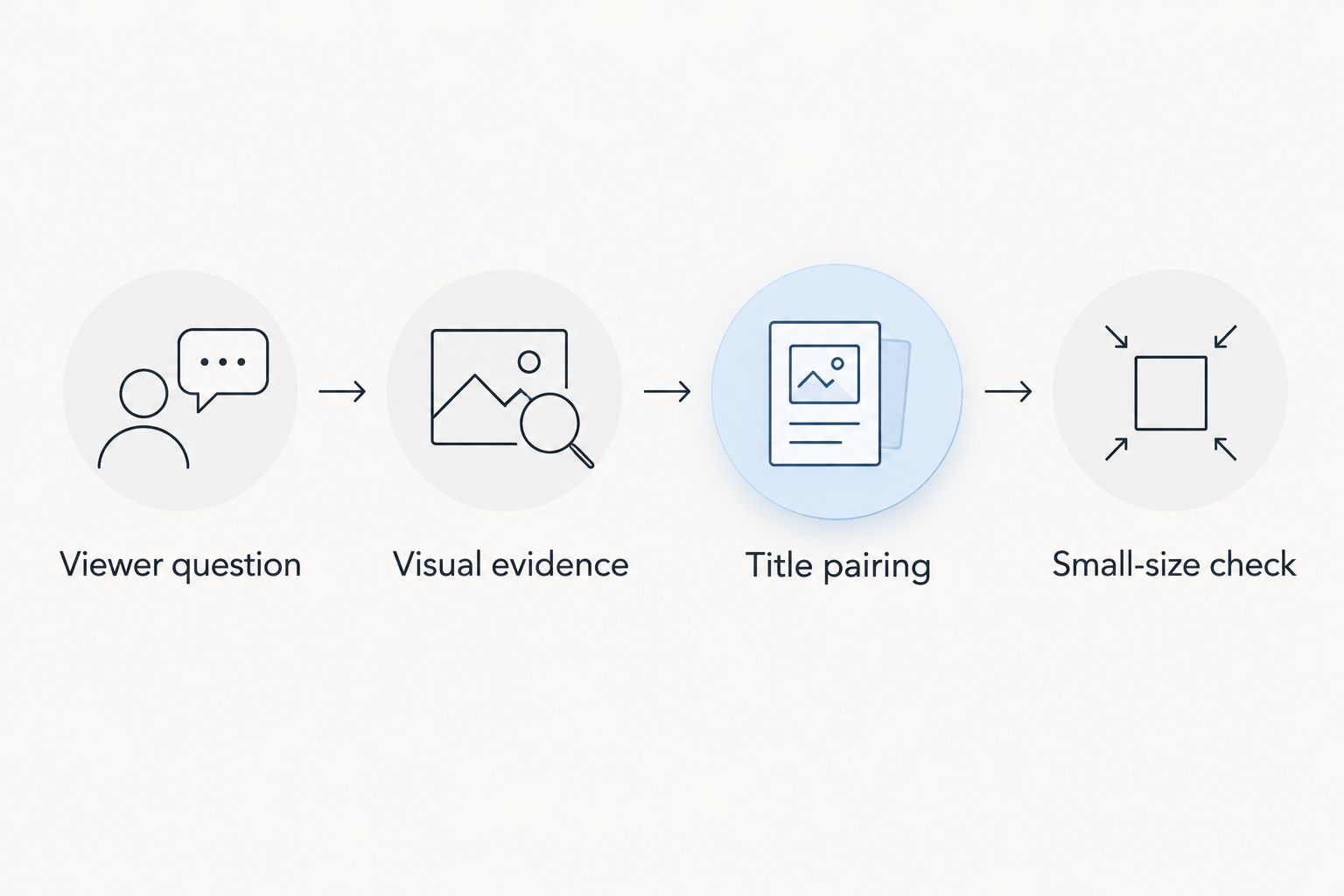
A design passes this process when you can explain why the main element belongs there. If the answer is only that it looks dramatic, revisit the concept before polishing the edges.
How these options were ranked
The ranking follows packaging fit, editing control, small-size clarity, repeatability, evidence discipline, and ownership. Each option has a different job: delegated design, simple assembly, advanced composites, browser editing, or shared layouts.
This is a use-case assessment, not a controlled CTR test. No ranking here establishes that a particular editor improves views. Your concept, audience, title, and video still determine what you are asking the viewer to click.
Which thumbnail option should you choose?
Choose Canva if you are undecided and want to design your own thumbnails. Move to Adobe Photoshop when detailed image editing becomes necessary, Photopea when browser-based editing matters, or Figma when maintaining shared layouts becomes the problem.
Choose a service when the unresolved question is what the thumbnail should communicate, not which button to press. Clickologi offers thumbnail design and packaging strategy; that makes it a relevant service alternative rather than another software recommendation.
For your next 2026 upload, settle the concept and title pairing before changing tools. Switching editors while keeping the same unclear idea simply relocates the problem.
FAQ
What's the best thumbnail design tool for a solo finance YouTuber?
Canva is the default recommendation for solo finance creators assembling simple, repeatable layouts. Choose Adobe Photoshop instead when your thumbnails require detailed masking, retouching, or photographic composites.
Is Clickologi a thumbnail design tool?
Clickologi is a creator design and marketing agency, not a self-service thumbnail editor. It offers YouTube thumbnail design, channel branding, and packaging strategy for creators who want service support.
Is Photoshop better than Canva for finance thumbnails?
Adobe Photoshop is better suited to detailed image editing; Canva is better suited to straightforward layout assembly. Choose based on the work your thumbnails require, not an assumed CTR advantage.
Can I edit layered thumbnail files in a browser?
Photopea supports browser-based layered image editing and PSD files. You still need to understand layers, masks, and export settings to make reliable changes.
What size should a YouTube thumbnail be?
YouTube's established guidance recommends 1280 × 720 pixels and a 16:9 aspect ratio. Check the reduced composition as well, because a correctly sized file can still contain unreadable text or a confusing focal point.
Should my thumbnail repeat my video title?
Your thumbnail should complement the title rather than repeat it. Use the image to establish the subject or tension and the title to explain the question or consequence.
Does a thumbnail design tool guarantee higher CTR?
No thumbnail design tool guarantees higher CTR. The editor controls how you construct the image, not whether the concept, title, and topic appeal to your audience.
One last thing
Audit the promise before you audit the design. A finance thumbnail can be readable, well edited, and still ask viewers to believe something the video never establishes.
Before publishing, explain the thumbnail's claim aloud and identify where the video supports it. If you cannot make that connection, change the packaging. A clearer promise is more useful than another layer of visual effects.