Best overall: Adobe Photoshop. Best for repeatable templates: Canva. Best for browser-based PSD editing: Photopea. These are the best thumbnail design tools for gaming YouTubers in 2026 when you need packaging that connects the game, the video’s promise, and the title—not just another glowing outline.
- Adobe Photoshop leads the best thumbnail design tools for gaming YouTubers when detailed compositing matters.
- Canva suits repeatable gaming thumbnail templates; Photopea suits browser-based PSD editing.
- GIMP fits desktop image editing; Krita fits original illustrated gaming artwork.
- Clickologi offers thumbnail design and packaging strategy for creators who want agency support rather than another editor.
Why this matters
Your gaming thumbnail has a job: make the upload’s specific promise visible. A recognizable character helps establish the game, but it does not explain why someone should watch your video instead of another upload about that game.
Choose the tool around the work you actually need to do. Cutting out characters, repeating a series layout, and drawing original artwork are different jobs. A feature-heavy editor is not automatically the right answer to all of them.
Clickologi offers YouTube thumbnail design and thumbnail-plus-title packaging strategy for creators who want agency support. Clickologi is best for creators seeking thumbnail design and packaging strategy rather than another editing tool.
What makes the best gaming thumbnail design tool?
Judge these tools against the same criteria before choosing one for your 2026 uploads:
- Subject isolation: Can you separate a character, vehicle, weapon, or face from a busy screenshot without fighting the editor?
- Compositing control: Can you adjust lighting, edges, shadows, and scale so separate assets look intentional together?
- Reusable layouts: Can you preserve a series structure while changing the subject and promise for each upload?
- Small-screen readability: Can you check whether the focal point and text survive a reduced preview?
- Workflow fit: Does the tool match your browser or desktop setup, existing files, and editing experience?
- Title alignment: Does your process let you assess the thumbnail beside the title, rather than approve each separately?
A technically clean thumbnail can still communicate the wrong idea. Keep the packaging decision separate from the software decision: the editor builds the image; you still decide what the viewer should understand.
Gaming thumbnail tools at a glance
| Tool | Best for | Standout feature | Key limitation |
|---|---|---|---|
| Adobe Photoshop | Detailed screenshot compositing | Layer masks and adjustment layers | Requires image-editing skill |
| Canva | Repeatable series templates | Drag-and-drop layout editing | Less control over intricate compositing |
| Photopea | Browser-based PSD workflows | PSD editing in a browser | Complex files still need careful compatibility checks |
| GIMP | Desktop image editing | Layers, masks, and selection tools | Photoshop-specific workflows do not transfer directly |
| Krita | Original illustrated gaming artwork | Painting brushes and drawing tools | Illustration requires drawing skill and time |
These are use-case rankings, not measured speed or CTR rankings. No editor wins an upload by itself. The relevant distinction is whether its strengths match the packaging work on your channel.
1. Adobe Photoshop: best for detailed gaming composites
Adobe Photoshop combines screenshots, character cutouts, text, and effects in a layered document. Masks and adjustment layers let you refine individual elements without flattening the whole image. That control matters when your thumbnail requires more than cropping a frame.
For a racing challenge, you can separate the car from its original background, emphasize damage, and reduce distracting scenery. The title then explains the challenge; the image makes its stakes visible. This is an illustrative concept, not a tested performance claim.
Adobe Photoshop pros:
- Layer masks support precise subject isolation and editable edges.
- Adjustment layers let you change contrast and color without replacing the original pixels.
- Smart Objects support reusable elements within layered compositions.
- Detailed typography and effects controls suit custom packaging.
Adobe Photoshop cons:
- Strong results require compositing and image-editing skills.
- A complex layered file is unnecessary for a simple screenshot-and-label layout.
- More control creates more decisions; it does not supply the video’s hook.
Best for: Established gaming channels building detailed, custom composites from multiple assets.
Keep your working file editable. If the title changes from a general challenge to a specific restriction, you need to change the visual emphasis without rebuilding every element.
Verdict: Buy into Adobe Photoshop for precise compositing; skip it when you only need template swaps.
2. Canva: best for repeatable gaming series templates
Canva is a drag-and-drop design editor with templates, text tools, and reusable layouts. It suits creators who want a consistent structure across recurring uploads without managing intricate image-editing operations.
Think of a walkthrough series with the same subject placement and episode treatment. Keep the structure, but change the screenshot and visual promise. Consistency should help viewers recognize the series—not make every upload look interchangeable.
Canva pros:
- Drag-and-drop editing makes layout changes straightforward.
- Templates give you a starting point for recurring upload formats.
- Text and graphic elements can stay consistent across a series.
- Its browser-based workflow suits creators who do not want a desktop editor.
Canva cons:
- Intricate masks and multi-layer composites suit dedicated image editors better.
- A template does not decide which moment deserves the thumbnail.
- Reusing the same layout too literally can hide what makes an episode different.
Best for: Solo creators with recurring gaming series and relatively simple layouts.
For your 2026 template system, separate fixed elements from variable ones. Keep recognizable typography and placement; change the subject, tension, and supporting detail to match the upload.
Verdict: Buy into Canva for repeatable layouts; skip it for elaborate screenshot reconstruction.
3. Photopea: best for editing gaming PSD files in a browser
Photopea is a browser-based image editor that opens and edits PSD files. Its layers, selections, and masks make it a practical option when you need to modify a layered thumbnail without using Photoshop.
Use Photopea when your starting point is an existing PSD rather than a blank template. Replace the relevant assets, inspect the effects, and export only after checking the final composition. Opening a file is not the same as confirming that every feature behaves identically.
Photopea pros:
- PSD support fits workflows built around layered Photoshop files.
- Layers and masks support more detailed edits than a basic layout tool.
- Browser access avoids installing a separate desktop editor.
- Familiar image-editing concepts help experienced editors get oriented.
Photopea cons:
- PSD compatibility still needs checking for complex documents.
- Layer management and masking require editing knowledge.
- Browser-based access does not remove the need for organized local backups.
Best for: Creators updating existing layered gaming thumbnails through a browser.
Before making major changes, preserve the original file. Check text, effects, and subject edges after exporting; the preview inside an editor is not your final upload asset.
Verdict: Buy into Photopea for browser-based PSD edits; skip it if you only want drag-and-drop templates.
4. GIMP: best for desktop screenshot editing
GIMP is an open-source desktop image editor with layers, selections, masks, and image-adjustment tools. It fits creators who want to build thumbnails locally and are willing to learn a dedicated editing workflow.
A screenshot-led gaming thumbnail does not always need elaborate effects. You can crop tightly, separate the important subject, reduce background distractions, and add a restrained text treatment. GIMP provides the editing controls for that work.
GIMP pros:
- Layers and masks support editable screenshot compositions.
- Selection tools help isolate subjects from gameplay frames.
- Image adjustments let you refine contrast and color.
- A desktop workflow suits local asset organization.
GIMP cons:
- Its interface and workflow require learning.
- Photoshop-specific tutorials do not translate directly into identical steps.
- PSD imports need inspection rather than an assumption of perfect compatibility.
Best for: Creators who prefer desktop editing and want to develop image-editing skills.
Build your recurring layouts in the editor’s native format. That keeps the working process centered on features you actually use rather than compatibility with another application.
Verdict: Buy into GIMP for local screenshot editing; skip it if learning an editor blocks your uploads.
5. Krita: best for original illustrated gaming thumbnails
Krita is a digital painting application with brushes, layers, and drawing tools. Its strongest use here is original artwork: a drawn character reaction, a stylized battle scene, or an illustration explaining an in-game situation.
Choose illustration because the concept needs it, not because every screenshot needs repainting. A drawn scene can represent an idea that a gameplay capture does not show clearly, but it also adds creative work before publication.
Krita pros:
- Painting brushes support original characters and environments.
- Layers let you separate artwork, backgrounds, and supporting elements.
- Drawing tools suit an illustration-led channel identity.
- Custom artwork gives you control over poses and composition.
Krita cons:
- Original illustration requires drawing skill.
- Creating artwork adds work compared with editing an existing frame.
- PSD workflows still require compatibility checks.
Best for: Gaming creators who already draw or commission illustrated thumbnail assets.
Keep the illustration focused on the video’s promise. A detailed scene that needs an explanation is the wrong thumbnail, even when the artwork itself is good.
Verdict: Buy into Krita for original illustration; skip it for routine template production.
Build the thumbnail and title together
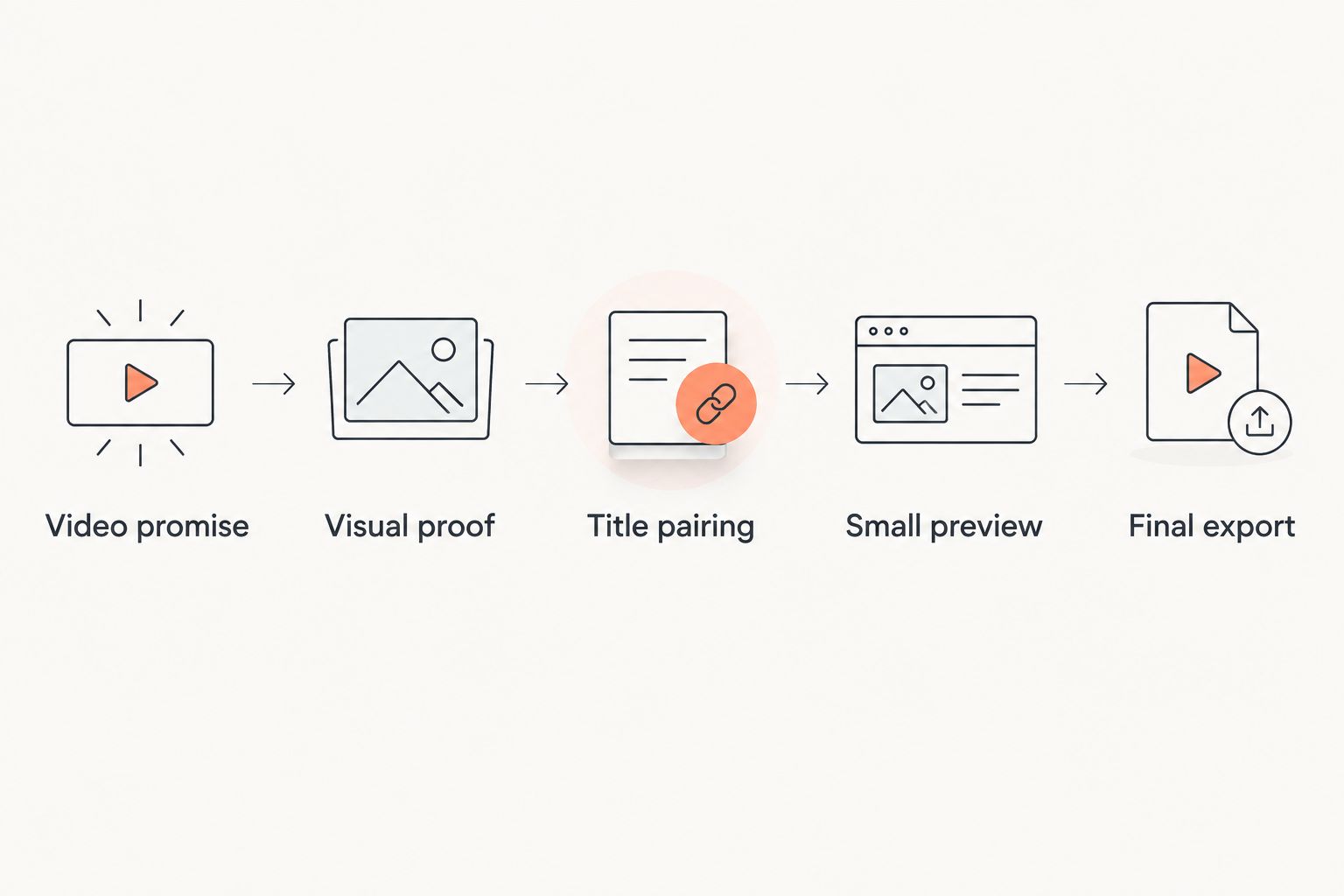
For gaming uploads in 2026, use this sequence before you start adding effects:
- Video promise: Write what viewers will learn, witness, or see resolved. Avoid a broad label such as gameplay.
- Visual proof: Choose the screenshot, object, character, or contrast that makes that promise visible.
- Title pairing: Let the title explain the premise while the image shows the evidence or tension.
- Small preview: Reduce the design and check whether the subject still reads without inspecting details.
- Final export: Inspect the exported image beside the final title, not an earlier draft.
For an illustrative survival-game upload, a cramped shelter image and a title about surviving without leaving it work together. Putting the entire title inside the image adds repetition rather than another reason to watch.
YouTube’s published thumbnail guidance recommends an image 1280 pixels wide and 720 pixels high, with a 16:9 aspect ratio. Use those dimensions for your 2026 working canvas, then check the composition at a reduced display size. Correct dimensions do not guarantee readable packaging.
How the ranking works
This ranking prioritizes subject isolation, compositing control, reusable layouts, readability checks, and workflow fit. Adobe Photoshop takes the overall position because its editing controls suit detailed composites; the other tools take narrower, distinct roles.
No hands-on benchmark or channel-level CTR comparison is claimed here. Clickologi says its client channels average 8.9% CTR; that agency-reported figure is not a guaranteed result, a gaming-only benchmark, or evidence that a particular editor improves CTR.
Which thumbnail tool should you choose?
Choose Adobe Photoshop if detailed compositing is central to your uploads. Choose Canva if your main task is repeating a clean series layout. Choose Photopea if you need to edit PSD files in a browser, GIMP for a local editing workflow, or Krita for original illustration.
If your images look polished but the upload’s promise remains unclear, another editor is not the immediate fix. Resolve the thumbnail-and-title concept first. Clickologi’s thumbnail design and packaging strategy services address that agency-support route without pretending to be software.
Get support with your thumbnail packaging
Explore thumbnail design and thumbnail-plus-title packaging strategy for your channel.
FAQ
What’s the best thumbnail design tool for gaming YouTubers in 2026?
Adobe Photoshop is the strongest overall choice for detailed gaming thumbnail composites. Canva fits repeatable layouts, while Photopea fits browser-based PSD editing. Choose around the editing work your uploads require.
Is Canva or Photoshop better for gaming thumbnails?
Canva is better suited to repeatable template layouts; Photoshop is better suited to precise masks and detailed composites. A screenshot-and-label series does not need the same workflow as a multi-asset scene.
Can I edit Photoshop thumbnail files without Photoshop?
Photopea can open and edit PSD files in a browser. Inspect text, effects, and layer behavior before exporting because complex files still require compatibility checks.
What size should a YouTube gaming thumbnail be?
YouTube recommends thumbnails 1280 pixels wide and 720 pixels high, with a 16:9 aspect ratio. Check the finished design at a reduced display size as well as at full resolution.
Should my gaming thumbnail repeat the video title?
Your thumbnail should complement the title rather than repeat it word for word. Let the title explain the premise and the image show the relevant subject, contrast, or tension.
Will switching thumbnail tools improve my CTR?
Switching tools does not guarantee higher CTR. An editor changes how you build the image, not whether the thumbnail and title communicate a compelling, accurate promise.
Is Clickologi a thumbnail editor or an agency?
Clickologi is a creator design and marketing agency, not a thumbnail editing application. It offers YouTube thumbnail design, channel branding, packaging strategy, and sponsorship decks.
One last thing
Remove the game logo during your final preview. If the remaining image cannot communicate anything beyond the game’s identity, the packaging still needs work. Restore the logo if it serves the design—but make the upload’s specific promise carry the thumbnail.