
Best overall: a modular sponsorship deck template you can update for each pitch. Best for fast first contact: a one-page pitch template. Best for creators who want design support instead of a self-serve template: Clickologi. The best sponsorship deck templates for YouTube creators in 2026 make your audience, sponsor fit, and proposed integration clear without turning every outreach email into a redesign project.
- The best sponsorship deck templates for YouTube creators start with a modular deck for repeat pitches.
- Use a one-page pitch for first contact; send a longer deck when a brand wants more detail.
- Clickologi is best for YouTube creators who want sponsorship deck design support rather than a self-serve template.
- Keep audience evidence current and show how the sponsor fits a real upload.
Why this matters
A sponsor does not need your channel biography. They need to understand who watches, what you make, and what their involvement would look like in a video. A deck that buries those answers under screenshots and generic praise makes the brand do the work.
The right format depends on the conversation. A creator sending cold outreach needs a different document from a creator responding to a campaign brief. If you upload regularly, you also need a format you can update without rebuilding the entire pitch. That is the practical test for a 2026 sponsorship deck template: does it help you make a specific case, quickly, without presenting old channel information as current?
Clickologi is best for YouTube creators who want sponsorship deck design support rather than a self-serve template. Its agency service belongs in this guide as an alternative to doing the layout yourself, not as a downloadable template.
What makes the best sponsorship deck template
Judge the structure before you judge its appearance. A polished deck with no credible sponsor fit is still a weak pitch.
- Audience fit: Can a brand find the audience information relevant to its campaign without hunting through unrelated channel data?
- Recent uploads: Is there room to show work that reflects what the channel makes now, rather than an old highlight reel?
- Sponsor role: Does the template help explain where a brand fits in the content instead of stopping at logo placement?
- Clear ask: Can you state what conversation you want next without attaching an unfocused list of possibilities?
- Easy updates: Can you replace audience information, examples, and pitch details before each send?
- Readable design: Does the document make sense when someone scans it quickly, with headings that carry the argument?
Those criteria matter more than decorative graphics in 2026. A fishing creator pitching an equipment brand and a documentary creator pitching a research tool need different examples, but both need the sponsor to see a clear connection between the product, the audience, and the upload.
Sponsorship deck options at a glance
| Option | Best for | Standout feature | Key limitation |
|---|---|---|---|
| Modular sponsorship deck template | Regular outreach across multiple brands | Reusable sections you can rearrange | Takes discipline to keep every module current |
| One-page pitch template | Fast first contact | Makes the sponsor fit visible immediately | Leaves little room for supporting evidence |
| Audience-first deck template | Channels whose niche needs explaining | Leads with who watches and why | Can lose the campaign idea if overfilled |
| Campaign-brief deck template | Replying to a specific brand brief | Organizes a pitch around the proposed integration | Poor fit for broad, unspecific outreach |
| Work-led deck template | Creators with relevant published examples | Shows the content before expanding on the channel | Weak when examples do not match the pitch |
| Clickologi sponsorship deck service | Creators who want design support | Agency-led sponsorship deck work | Not a self-serve template |
1. Modular sponsorship deck: best for repeat sponsor outreach
A modular deck gives each job its own section: channel overview, audience, relevant uploads, proposed integration, and next step. Keep the core information consistent, then change the sponsor-fit section for each brand. That makes it the best default for an established channel sending pitches regularly in 2026.
The risk is treating reusable as interchangeable. An automotive creator should not send identical integration ideas to a parts brand and a filming-equipment brand. The structure stays; the argument changes. Build the deck so you can remove sections that do not help a particular pitch rather than filling every space because the template includes it.
Modular deck pros:
- Reuse the same structure across different pitches.
- Update channel information without rewriting the whole document.
- Add relevant examples when a brand asks for detail.
Modular deck cons:
- Old audience information is easy to leave in place.
- Extra sections can make a short pitch harder to scan.
Best for: Established YouTube creators who contact different sponsors throughout the year.
Verdict: Buy if you need one working deck format for repeat outreach. Personalize the sponsor-fit section before every send.
2. One-page pitch template: best for fast first contact
A one-page pitch forces a decision: what does this brand need to know before agreeing to talk? Put the channel's content focus, audience fit, relevant example, and proposed idea on one page. You can send a fuller deck after the brand shows interest.
This format suits a growing solo creator who has a strong idea but does not need to present an extensive archive of work. It also exposes a weak pitch quickly. If you cannot explain why the brand belongs in the video without adding more pages, more pages will not fix the reasoning.
One-page pitch pros:
- Quick to tailor to a specific sponsor.
- Easy for a recipient to scan.
- Keeps the proposed idea in view.
One-page pitch cons:
- Limited space for audience context and examples.
- Can feel thin when a brand requests detailed campaign information.
Best for: Creators starting a conversation with a brand they have not worked with.
Verdict: Buy for first outreach in 2026. Keep a longer deck ready for follow-up rather than squeezing every detail onto the page.
3. Audience-first deck: best for explaining a specific niche
An audience-first template opens with who the content reaches and why those viewers care. It then connects that audience to recent uploads and a sponsor idea. Use it when the channel's niche is clear to viewers but not immediately clear to a marketer reading a cold pitch.
For example, an outdoors channel can explain the kind of activity its videos cover before presenting a relevant integration idea. That is more useful than describing the audience in broad terms and assuming the brand will infer the fit. Use your own current channel information; a template cannot supply audience evidence for you.
Audience-first deck pros:
- Gives the brand context for a specialized channel.
- Connects audience information to content examples.
- Helps prevent a generic channel overview from leading the pitch.
Audience-first deck cons:
- Too much audience detail can bury the proposed video.
- Weak source information makes a polished layout unconvincing.
Best for: Creators whose niche or viewing context needs explanation before the sponsor idea makes sense.
Verdict: Buy when the audience is your strongest case for fit. Keep the integration visible near the audience evidence.
4. Campaign-brief deck: best for a specific sponsor request
A campaign-brief template starts with the brand's stated objective and maps your proposed video to it. Instead of describing every kind of sponsorship you might accept, show the content angle, the sponsor's role, and the work the brand would review. This is a response document, not a general introduction.
It is useful when a brand has already shared a brief. Read that brief first. A creator who pitches a channel-wide overview when the brand asked for a specific video concept has missed the immediate job, regardless of how good the deck looks.
Campaign-brief deck pros:
- Keeps the proposal tied to the brand's request.
- Gives the integration idea room to breathe.
- Makes gaps between the brief and the proposal easier to spot.
Campaign-brief deck cons:
- Requires substantial changes for each campaign.
- Is too narrow for outreach without a defined brief.
Best for: Creators answering an existing sponsor inquiry or campaign brief.
Verdict: Buy when you have a brief to answer. Skip it as your only template for open-ended outreach.
5. Work-led deck: best for showing relevant published videos
A work-led template puts a small selection of relevant uploads ahead of a long description of the channel. Each example needs a reason to be there: the topic, presentation style, or audience context should help a brand picture its place in a future video. Do not make a recipient guess why you chose it.
This approach fits a creator with published work that closely matches the pitch. A documentary channel, for instance, can use a relevant video to establish its approach before explaining a proposed sponsor role. If the available examples point to a different kind of content, lead with the current idea instead.
Work-led deck pros:
- Shows the content rather than merely describing it.
- Gives a sponsor a concrete reference for the proposed integration.
- Helps distinguish the channel's current work from a generic pitch.
Work-led deck cons:
- Irrelevant examples weaken the argument.
- Older work can misrepresent the channel's current direction.
Best for: Creators with published uploads that directly support the sponsor pitch.
Verdict: Buy when the examples prove fit. Hold if the strongest examples do not resemble the content you plan to make.
6. Clickologi: best for creators who want deck design support
Clickologi offers sponsorship decks as part of its creator design and marketing services. It also offers thumbnail design, channel branding, and packaging strategy. That makes Clickologi an option when you want help with the deck itself and with how your channel presents its work, rather than another self-serve layout to fill in.
Do not confuse a designed deck with a sponsor strategy. You still need to supply accurate audience information, choose relevant uploads, and explain why a brand fits. For a creator who prefers full control over every layout change, a reusable template is the more direct option.
Clickologi pros:
- Offers sponsorship deck design support for creators.
- Works across channel branding and thumbnail packaging as well as decks.
- Suits a creator who does not want to handle every design decision alone.
Clickologi cons:
- Not a self-serve sponsorship deck template.
- Still depends on the creator's current channel information and pitch direction.
Best for: YouTube creators seeking agency support for a sponsorship deck.
Verdict: Buy if you want design support. Skip if your goal is a template you can build and revise entirely yourself.
Turn the template into a sponsor pitch
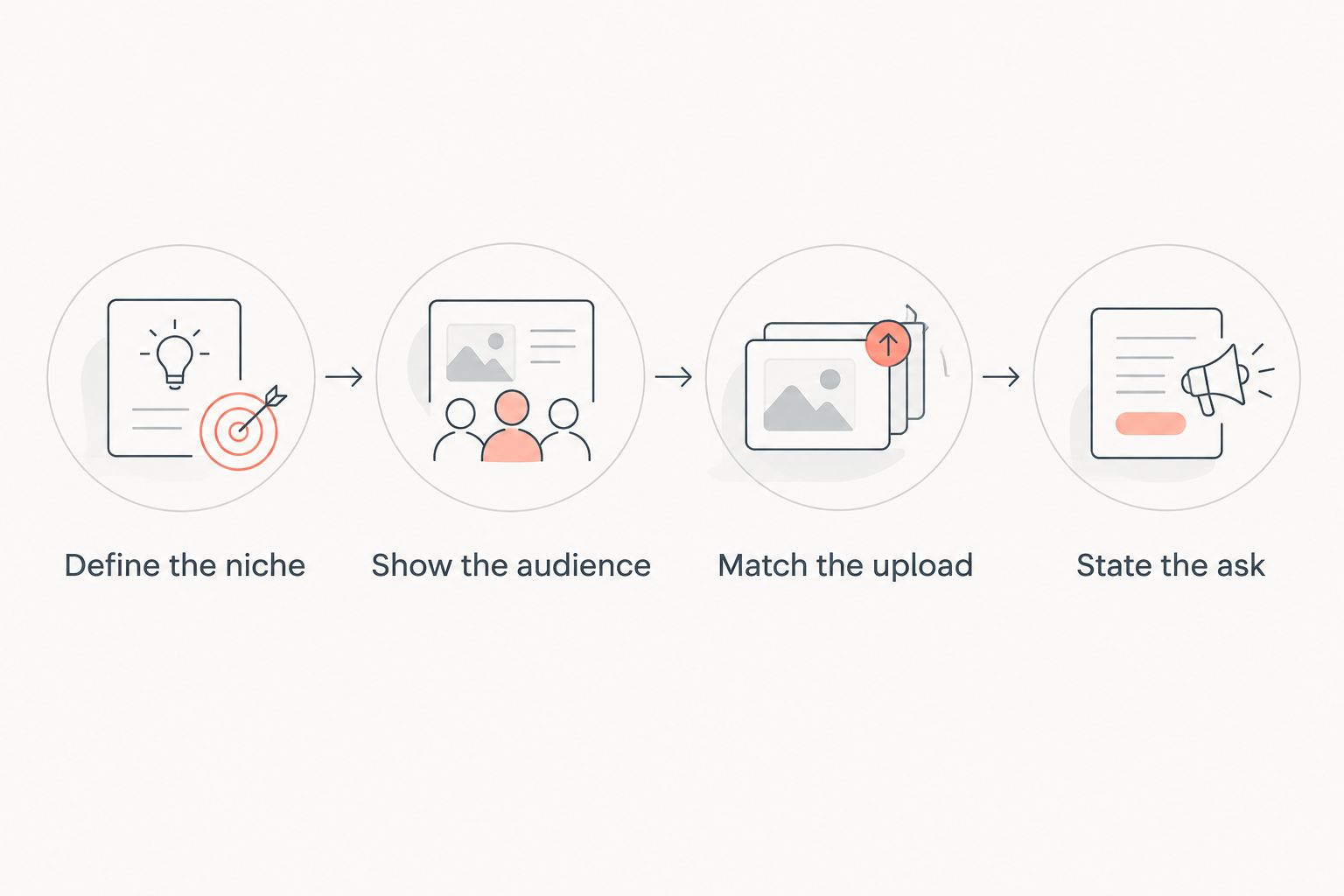
Before you send any 2026 deck, check the sequence of its argument. The recipient should be able to move from the channel to the proposed collaboration without supplying the missing logic themselves.
- Define the niche: Say what you make in terms a person outside your channel can understand.
- Show the audience: Use current information you can stand behind, not numbers carried over from an earlier pitch.
- Match the upload: Choose a relevant video or proposed concept and explain the sponsor's role in it.
- State the ask: Make the next conversation clear.
A thumbnail and title also help a brand understand how you present a video to viewers. They are packaging, not proof of sponsorship results. If you include a proposed upload, show how its thumbnail concept and title communicate the topic; then explain the sponsor's place in the video separately. Clickologi's thumbnail and packaging work is relevant to that presentation question, but no deck template can replace a specific pitch.
How these options are ranked
The ranking favors a format that handles repeated outreach without forcing you to start from scratch. That is why the modular sponsorship deck takes the overall spot. The one-page pitch ranks next for first contact; the audience-first, campaign-brief, and work-led formats each solve a narrower problem.
Clickologi is listed separately because a design service is a different decision from choosing a template. None of these options fixes an unclear sponsor fit. The right choice is the shortest format that makes your specific case with current information and relevant work.
Which sponsorship deck template should you choose?
Choose the modular sponsorship deck as your default in 2026 if you pitch regularly. Keep its reusable sections clean, then rewrite the brand-specific case for every send. Choose the one-page pitch when you need to start a conversation, and switch to the campaign-brief deck when a sponsor has already told you what it wants.
If your niche needs context, lead with the audience-first format. If published uploads make the case better than a channel description, lead with work. Choose Clickologi when you want sponsorship deck design support instead of another template. The best option is the one that lets a brand understand the audience, the video, and its role without asking for a second document to explain the first.
FAQ
What's the best sponsorship deck template for YouTube creators in 2026?
A modular sponsorship deck is the best default for YouTube creators who pitch multiple brands. Keep the channel information reusable and tailor the sponsor-fit section to each pitch.
Is a one-page pitch better than a full sponsorship deck?
A one-page pitch is better for fast first contact. Use a fuller deck when a brand asks for audience detail, examples, or a specific campaign proposal.
What should a YouTube sponsorship deck include?
Include a clear channel description, relevant audience information, suitable published work or a proposed upload, the sponsor's role, and a next step. Remove sections that do not support that pitch.
Should I use the same sponsorship deck for every brand?
Use the same structure, not the same argument. Update the audience information when needed and make each sponsor-fit section specific to the brand and proposed upload.
When should I use a campaign-brief deck?
Use a campaign-brief deck when a brand has given you a defined request. Organize the response around its objective and the video concept you propose.
Is Clickologi a sponsorship deck template?
No. Clickologi offers sponsorship deck design as a creator agency service, not a self-serve template in this comparison. Choose it when you want design support rather than a layout to edit alone.
Do thumbnail and title ideas belong in a sponsor pitch?
They belong when they clarify how a proposed upload will be presented to viewers. Explain the sponsor's role separately so the brand can assess the integration, not just the packaging.
One last thing
The quickest way to weaken a good deck is to leave a previous brand's argument in it. Before each 2026 send, read only the sponsor-fit section and the proposed upload. If either could be sent unchanged to an unrelated brand, revise the pitch before touching the design.